
We also gave the everyday details plenty of attention: keeping your place after a refresh, making long identifiers readable on a phone, preserving keyboard focus, and explaining exactly why a review or investigation could not finish.
Here's what we shipped during November 9–15.
Investigations, deploy verification and scheduled scans are part of the production-agent roadmap and are not available to new workspaces today; the changes below improve them for the workspaces that already use them. Change checks are available now. Talk to the team about availability.
Get findings while the review continues#
Supported code findings can now reach your pull request as each logical change finishes review. Proofline publishes them as a GitHub review while it continues investigating the rest of the change.
Those early findings still follow the review's publication rules, comment limits, repository access checks, and exact commit identity. Final publication accounts for what has already been posted. The Check and gate retain their own completion rules.
For a change that deserves closer examination, the deep review pull request command now raises the review depth for that pull request and its later pushes. We removed the separate Deep Review and Effort controls, bringing the request into the ordinary review flow.
Share reviews and keep the conversation connected#
Public review and finding links now open in a reader without requiring sign-in. Public review pages also provide readable content for crawlers and link previews, making a shared result easier to inspect before opening the console.
Inside the walkthrough, we improved folded steps, source excerpts, and retained answers. Links open the intended step, and answers remain reachable when their step is folded. Linked Slack discussions are available to people authorized to read the channel.
The Changes and Overview views received clearer finding excerpts, more readable diffs in dark mode, and more consistent finding counts. Review pages distinguish an incomplete result from a completed one and explain waits, credit refusals, and GitHub rate limits more directly.
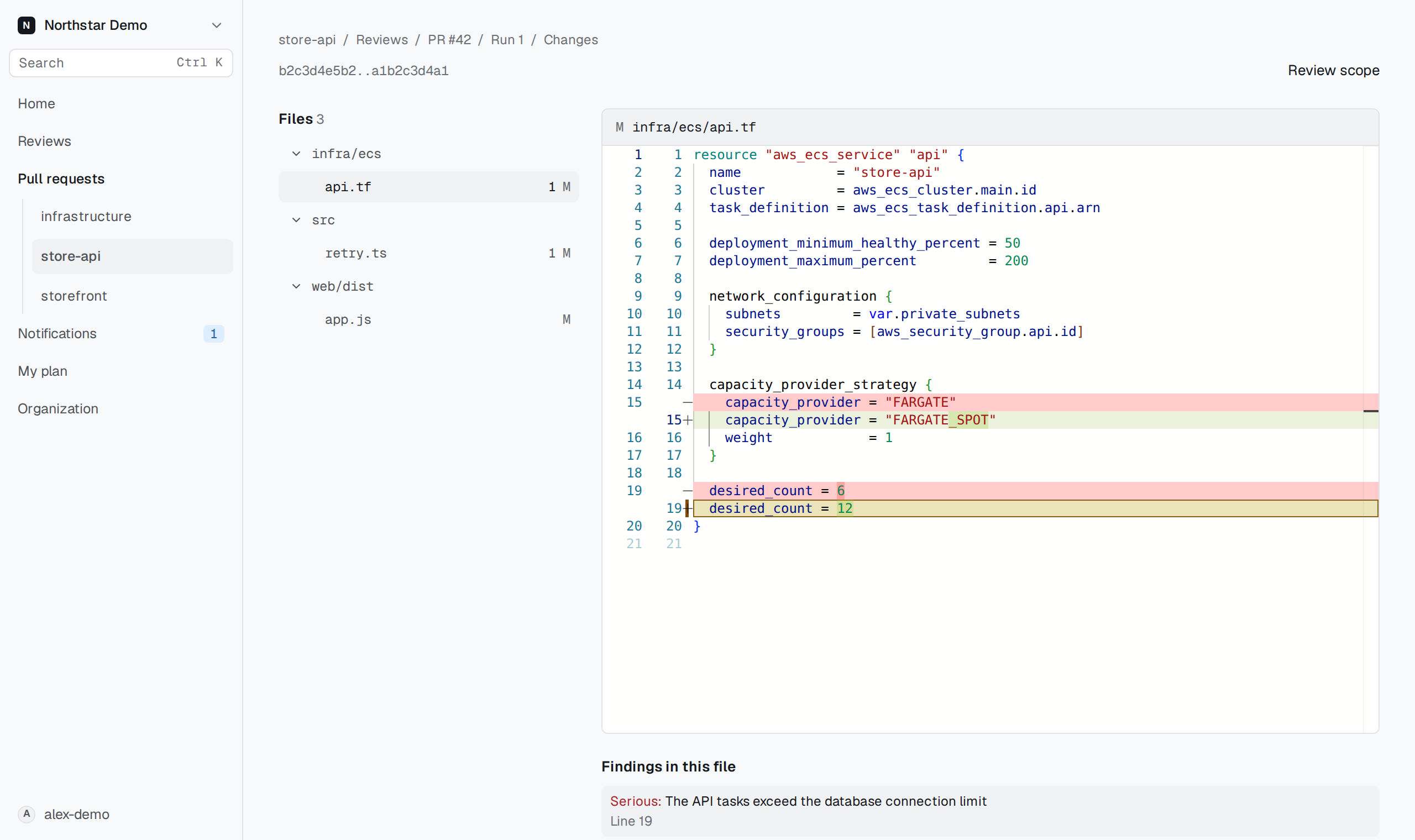
Read a finding beside the changed code, with its impact and next actions in the same view. Fictional Northstar demo.
Choose which pull requests receive automatic reviews#
Administrators can now set the percentage of pull requests reviewed automatically, with organization defaults and repository overrides.
Selection follows the pull request's identity, so repeated pushes and retries keep the same selection under the recorded policy. A skipped pull request gets a clearly named Check. You can still request its review with @proofline review.
Sampling gives teams a practical way to control automatic review volume. A skipped review does not pass a merge gate.
We also improved the path from draft to ready: when draft reviews are disabled, marking a pull request ready at the same commit can start the review it needs.
Move from a finding to the next action#
Finding judgments now explain the available choices more clearly, including through keyboard and touch interaction. Fix and finishing-recipe proposals open from their pull request reply links, and Fix all takes the most severe findings first.
Administrators can enable fix generation in review settings. Path-label suggestions, reviewer routing, and agent-authored pull request policies also received clearer help and more reliable handling of GitHub read limits.
Use a merge gate for code-only repositories#
An active, connected repository can now configure a code-only merge gate without first linking an environment.
We also repaired interrupted-review recovery, added a route to rerun a gate from its GitHub Check, and improved the explanations for blocked decisions and merge-group waits. Earlier decisions remain in the history.
Code-only gates apply to code-review results. They do not establish that an environment was assessed.
Ask an investigation question where the work is happening#
You can ask Proofline to investigate a symptom from a pull request or your connected Slack channel. A pull request comment such as @proofline investigate production: checkout returns 502 gives the investigation a concrete starting point.
The answer returns to the place you asked, with changes to inspect and a link to the investigation. When recent alert investigations in the same environment have already recorded relevant telemetry, the question can reuse those reads. Their original query windows remain part of the evidence.
Environment selection and access checks happen before the investigation starts. If Proofline cannot select one environment, its reply names the choices so you can make the request precise.
Bring Sentry alerts into the investigation flow#
You can now connect a Sentry organization, select its US or DE region, and link the environments allowed to use its telemetry.
Sentry issue alerts can open investigations that cite the issue and bounded event windows. An alert connection must identify exactly one environment to start an investigation. When it cannot, the connection page records what happened and gives administrators a clear place to repair the link.
Recurring Sentry and CloudWatch alerts can reply in an earlier Slack thread for the same alert and environment. That keeps repeated openings together while preserving each investigation's result.
Alert investigation results also reach the console Inbox. For grouped PagerDuty incidents, the investigation can attach its note to every incident it covers, and the console shows more of the delivery history and close coverage.
Follow the evidence behind an investigation#
An investigation's conclusion is easier to inspect, with direct paths to the timeline entries and recorded evidence behind it.
A candidate change can open its cited timeline entries directly. Review receipts identify the exact assessment, commit, and evidence bundle read. Serving observations, telemetry reads, and configuration comparisons expose their retained Kian references, with controls for copying exact identifiers.
Timelines bring together deploys, merges, configuration changes, serving revisions, and alert openings and closes. Leads use more recognizable resource names and show why they appear in the list. Earlier incidents help distinguish a new change from a symptom that had already appeared.
You can filter investigations by trigger and state, browse other investigations of the same alert, and return to the same filtered page after inspecting a result. Administrators can rerun a finished investigation; each rerun preserves its own conclusion and evidence.
When an investigation cannot finish, its explanation is more precise. Partial metric windows, unreadable sources, cancelled runs, and investigations stopped after failures have distinct explanations.
Read more of the evidence an alert points to#
We expanded targeted investigation reads for Google Cloud alerts, including supported GKE container, pod, node, and cluster logs; Cloud Functions execution logs; App Engine output; Workflows execution and call logs; Composer component logs; and Dataproc diagnostic logs.
Additional paths cover supported BigQuery transfer diagnostics, Cloud NAT flow logs, Cloud Storage relocation errors, and Pub/Sub import failures. Resource citations connect supported alerts to the cluster, service, dataset, workflow, or other resource they name.
AWS investigations gained more specific inventory connections too, including the ACM certificate, service quota, or Lambda routing information associated with supported alarms.
Each read has its own resource scope and time window. Missing access or unsupported evidence remains visible in the investigation.
See a deployment's signals and follow-up more clearly#
The one-day verification checkpoint now compares signals with the same hours on the previous day. The deploy page shows that comparison alongside the other checkpoint readings.
For supported request signals, a regression can include the routes behind it. Delivery receipts show where a regression report went, and repeated notifications are grouped to make the history easier to scan.
We also improved AWS runtime setup. ECS services without a commit binding are named in the Inbox and deploy views. Services that include containers built elsewhere can identify those containers separately, keeping the repository's own image matching focused.
Configure the AWS production loop.
Expand deterministic latent-risk checks#
Google Cloud latent-risk scans gained checks for more concrete infrastructure conditions:
- Cloud Run services whose runtime accounts cannot access referenced secrets.
- Disabled or destroyed secret versions used by ready revisions.
- Disabled or deleted runtime service accounts, where the collected evidence can establish that state.
- Failed managed-certificate provisioning, renewal, or domain authorization.
- Public Cloud SQL authorized networks and firewall rules targeting missing service accounts.
- Project quotas whose recorded usage reaches at least 80 percent of the recorded limit.
These checks run without a model call. They use collected infrastructure evidence and report gaps when that evidence cannot establish the condition.
Scan forms now show validation beside the relevant field, and repository scan schedules can be deleted. Fix follow-up also shows more of the connection between a rule-opened fix pull request, its merge, and a later scan.
Let your coding agent prepare configuration changes#
Connected coding agents can read more of your Proofline configuration and prepare proposed changes across review settings, connections, delivery, scan schedules, roles, model settings, and other supported operations.
Sensitive operations produce an approval link. The page shows the requested operation, the values being changed, who requested it, and any cited files at the commits the agent read. An administrator can approve that exact proposal or reject it.
A proposal expires if nobody decides it. If the configuration has moved since the agent read it, the agent must read it again and prepare a fresh proposal.
Review a coding agent's configuration proposal.
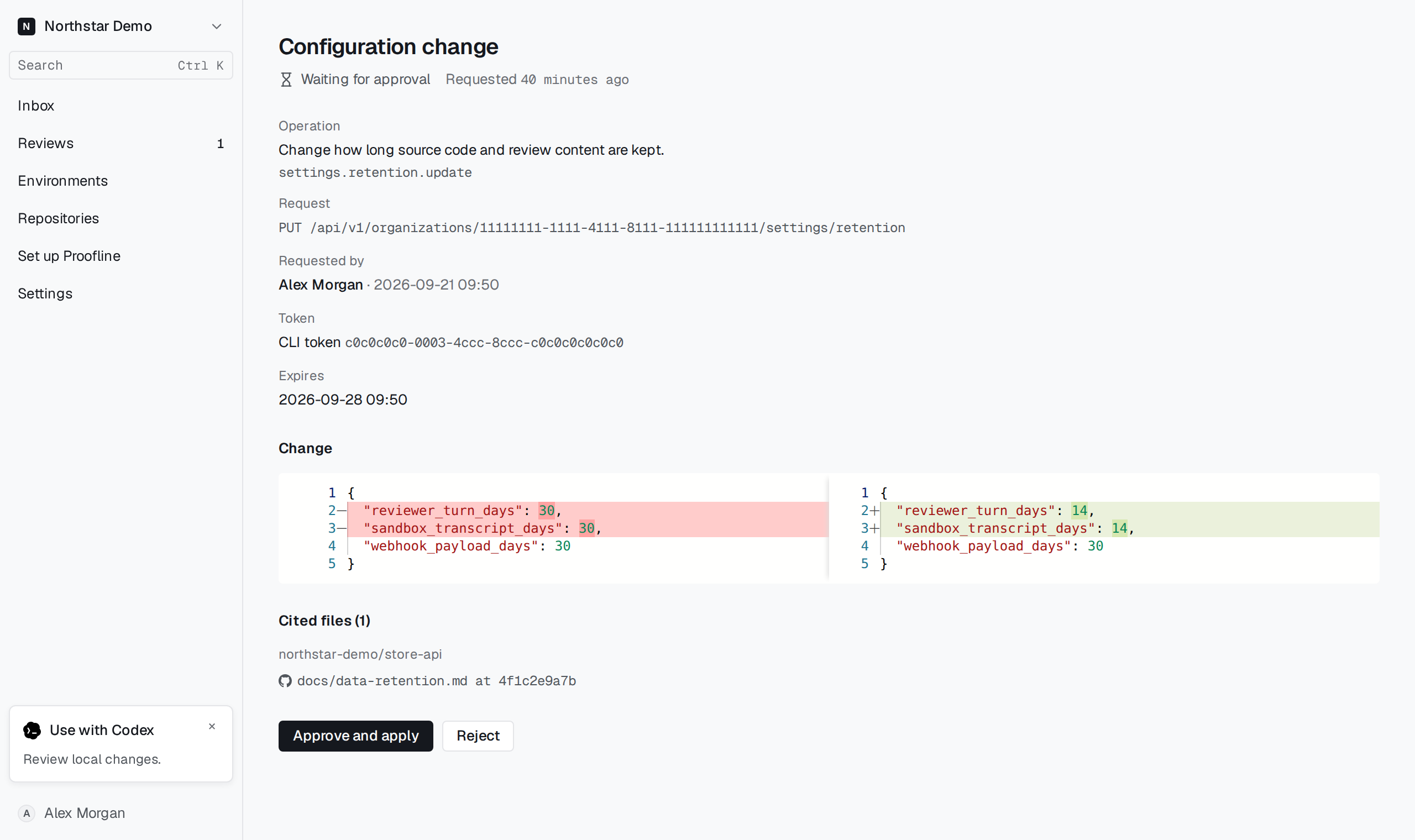
Review the agent's proposed settings change, its cited file, and the before-and-after values before applying it. Fictional Northstar demo.
Get through setup with clearer choices#
Setup forms now keep saved choices in view and offer suggestions for the step you're working on. Answers, saved choices, and handoffs to a coding agent remain easier to follow as the conversation progresses.
AWS connection setup lets you leave optional reads out of the requested role and records the resulting inventory gaps. Terraform change sets can prepare inventory-grant updates for existing roles. Google Cloud setup can suggest declared services, GKE clusters, and namespaces from repository configuration.
We repaired navigation after deferral, preserved setup drafts, improved pending-connection removal, and made connection failures explicit. Delivery setup also handles environments that do not use GitHub Actions without asking for an unrelated GitHub Environment.
Understand what a review costs#
A review's Details tab now shows its credit cost, including the amount spent so far while it runs. Review-time model calls are attributed to their review and repository, making Usage and repository spend limits easier to reconcile.
Starting or rerunning a review explains that it spends credits. Rerun confirmation can show the previous run's cost and identify when the commit has not changed.
Billing, Seats, Account, My plan, and Usage now present plan and balance information more consistently. Usage ranks repositories by credit spend, separates own-key usage, and explains charges with no repository.
We also repaired links from credit warnings and made credit and spend-limit refusals clearer. The workspace-plan implementation received updates too; purchasing availability remains separate from that implementation.
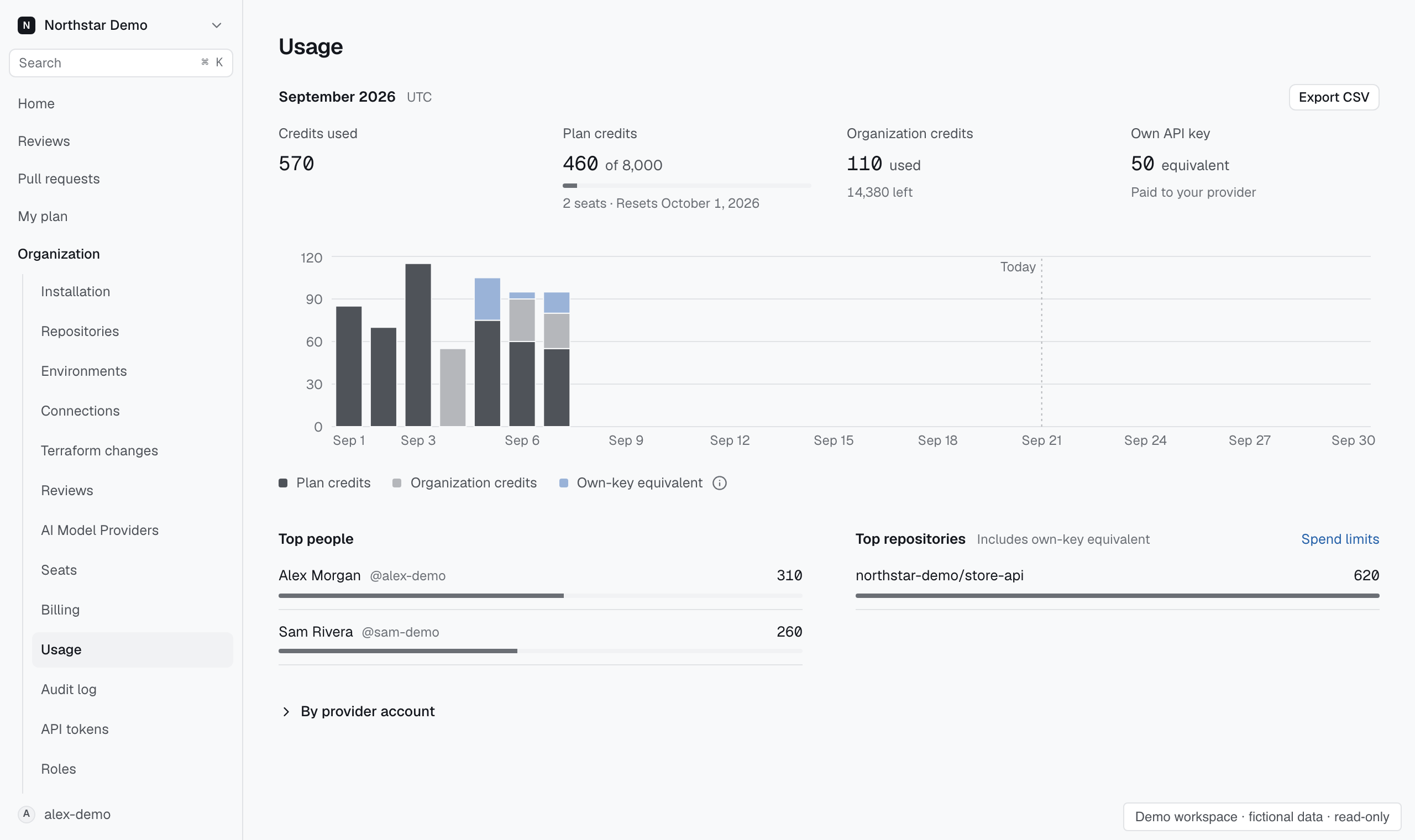
See usage by funding source, person, and repository. Fictional Northstar demo; the September dates and amounts are example data.
Keep everyday work moving#
We shipped a long list of improvements to make everyday console work easier:
- Review lists refresh while work is active, and the Inbox shows recent activity and current GitHub review waits.
- Failed reads offer more focused retries and preserve already loaded evidence where possible.
- Filters, date ranges, pagination, and return links keep their place through navigation.
- Keyboard focus survives saves, refreshes, removals, and loading more rows; assistive technology receives clearer action names and completion announcements.
- Long identifiers, settings, investigation rows, and billing values fit more consistently on phones and tablets.
- Destructive actions have confirmation dialogs, and validation appears beside the field that needs attention.
- Audit history explains changes field by field and uses clearer resource and action names.
- Search explains accepted qualifiers and suggests a nearby match when a qualifier is invalid.
Shared Session Recorder reports also became readable session timelines, with clearer event descriptions and preserved multiline narration.
Improve the tools and foundations around the product#
The CLI and SDKs received more consistent review outcomes, structured error handling, and SARIF category coverage. The MCP bridge received connection-lifecycle fixes, and coding-agent setup and configuration guidance expanded.
For Proofline operators, new and expanded reports cover review performance and endings, investigation evidence and outcomes, deploy coverage, scans, workflow failures, sandbox jobs, setup health, billing, and delivery. Those views help us trace a problem to its recorded work and follow the repair.
We continued consolidating infrastructure evidence in Kian and removing retired World paths. Release and CI work improved recovery, source tracking, dependency maintenance, and the route from a checked change to a recorded deployment.
Pull request secret scanning now follows every added commit across paginated comparisons. GitHub quota handling reserves capacity for review and gate work, retries supported rate-limited reads, and makes waits visible to operators and affected teams.
The public-review pilot gained more inspectable brief, rating, preview, and publication history, along with repository exclusions and maintainer withdrawal requests. That gives the people running the pilot clearer control over what is considered and what is published.
The website and help center received refreshed setup instructions, review and gate explanations, an editable review-cost estimator, pricing guidance, more readable comparison tables, and improvements to phone layouts, keyboard navigation, and shared links.
Thank you to everyone who reported a confusing state, a missing explanation, or a broken step. Your reports helped us turn those rough spots into fixes throughout this week's releases.