
Reviews are 9× faster#
From November 4 to November 9, daily median review time fell from 31 minutes to 3.6 minutes. Daily medians stayed below two minutes on three consecutive days.
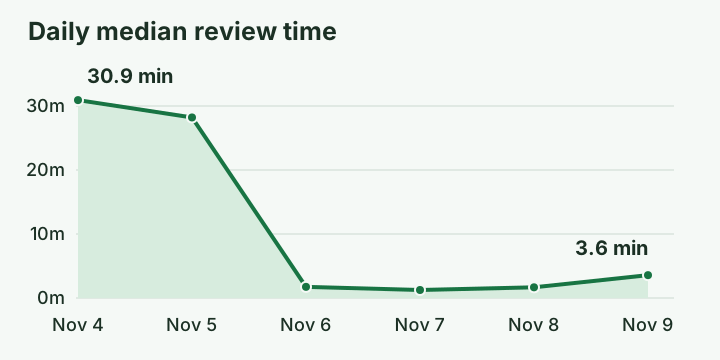
Production observations for completed and incomplete review runs; review mix varies by day. The improvement is rounded to the nearest whole multiple.
We parallelized independent code investigations, reused source reads, and removed unnecessary waits before publishing findings. As a result, ready findings can reach your pull request sooner. Slack delivery retries no longer hold up review progress, either.
The console received attention too. Review pages reuse short-lived read authorization, load both sides of a changed file concurrently, and avoid repeated setup reads—all reducing the work between opening a review and reading the code that needs your attention.
Understand a pull request step by step#
The new Walkthrough explains a change in reading order, with cited code beside each step. Starting with the pull request's purpose, it connects that purpose to what the diff does. When Author check appears, it highlights behavior omitted from the description or claims unsupported by the implementation.
Each step gives you a place to investigate further: choose Ask about this, or select specific lines and choose Ask about lines. Answers can include the code they cite, keeping the explanation and its source together. Any illustrations are labeled as illustrations and are not checked against the code.
When a step's answer cites code and leaves nothing unsettled, it becomes part of the walkthrough under Answered questions for other organization members. After a later push, the answer stays under steps whose code did not change, while Changed markers identify rewritten steps. The earlier walkthrough remains available for comparison.
Catch complexity before it becomes maintenance work#
The new Maintainability and quality review examines unnecessary complexity, implicit assumptions, duplicated responsibilities, and verification gaps introduced or worsened by a change.
For each simplification candidate, the review must explain a concrete maintenance cost, cite the source, and suggest a smaller alternative. The author can then evaluate which responsibility is duplicated, which assumption is hidden, or which part of the implementation could become simpler. Style preferences and unsupported concerns are excluded; simplification candidates stay distinct from runtime defects.
The feature is off by default. To enable it, go to Settings → Review policy → Code review for your organization, or turn it on for selected repositories. It uses the code review's existing model and budget, with saved choices applying to new assessments.
Configure maintainability reviews.
See beyond one repository#
A change to an interface can affect code in another repository. To follow that impact, reviews can now read related repositories at recorded commits, using catalogs of the interfaces those repositories provide and consume to find relevant context.
Repository clusters help identify those relationships by bringing services and their consumers together. From there, the reviewer selects the context relevant to the change. When that context is available, walkthrough steps can show consumers in related repositories, helping readers follow a change across repository boundaries.
These reads have limits: related repositories must belong to the same organization and GitHub installation, and administrators control access through Read related repositories. Publication also respects repository visibility: a finding names a related repository only when every reader of the pull request can read it.
Work through findings inside the diff#
The redesigned Changes view presents changed files one after another, with findings directly beneath the lines they cite. You can scroll through the whole change, expand folded context, or jump to a file from Files. For keyboard navigation, use j and k to move between files, and n and p to move between findings.
For a prioritized view, the review overview leads with what remains to address, ordered by severity. Cited code appears above each finding's explanation, with impact, recommended actions, and available assessment controls nearby, so you can inspect the failure mechanism and record your judgment without losing your place in the change.
The Details tab brings together the reviewed commits, checks, skipped files, and publishing outcome, and tells you when the pull request has moved beyond the reviewed head. Earlier findings and assessments remain in the history, so you can trace what was checked before.
Go from an alarm to a focused investigation#
An environment's Investigations page collects its investigations, including those started by connected alarm sources. Open a result to see its conclusion and candidate changes, with links to deployments or reviews worth examining.
When supported by the evidence, Likely cause names the candidate change and cites the timeline entries behind the conclusion. When the evidence leaves the cause unsettled, Ranked leads gives you a focused starting point. Either way, you have a concrete next step: inspect a deployment, open its review, or compare the candidate with the symptom window.
To examine the supporting evidence, open the Evidence tab. It shows the reviews and recorded telemetry reads used by the investigation, including query windows and coverage. Connected Slack delivery brings the investigation back to the team, while PagerDuty investigations record the incident-note outcome. If a missing connection or permission has a repair path, administrators see the relevant setup action beside the conclusion.
Follow a deployment into production#
Deploy verification compares configured signals at four checkpoints (landing, 20 minutes, one hour, and one day) with those from the hour before deployment. Each checkpoint adds an observation to the deployment's record, letting you follow how its signals change after it lands.
For AWS environments, configure CloudWatch metrics by specifying their exact dimensions, statistic, direction of deterioration, tolerance, and minimum change. The deploy page then shows baseline and observed values alongside verification results. From the 20-minute checkpoint onward, a detected regression can be reported to the pull request or commit, Slack, and the Inbox.
Verification uses the environment's configured delivery links and signals; missing or unreadable signals leave the relevant check incomplete. Deployment gates remain separately configured, so you can use verification to follow a rollout without changing your merge or deployment policy.
Turn confirmed problems into reviewable fixes#
The Latent risks page brings together scan schedules, recent results, and existing problems. To configure scans, choose a nightly or weekly schedule, a time zone, the families to examine, and a credit ceiling. Each result shows which families were examined and where evidence was missing.
For a reported problem, request confirmation against a linked repository. An administrator's automatic-fix rule can then turn confirmed scan problems into draft pull requests for a chosen environment and repository. A limit on open fix pull requests keeps the amount of proposed work under your control.
Each fix includes a Kian re-check section naming the checked commit, the confirmed requirement, and the result. If the administrator's rule still covers the fix, a qualified recheck that finds no counterexample can move the draft to ready for review. An incomplete result or a remaining counterexample keeps it in draft with an explanation. Each new commit receives a new recheck, while the earlier result is preserved.
Your team still keeps the merge decision: Proofline never merges the pull request. Each recheck's result applies to the specific requirement it examined.
Configure scans and automatic fixes.
Bring the week's production work into Slack#
Weekly environment reports bring investigations, deploy verification, latent-risk scans, and fix pull requests together in one place, giving the team a shared view of what Proofline investigated, which deployments received checks, and what follow-up work remains.
Enable a report under an environment's Setup → Weekly report page. After each Monday-to-Sunday reporting week, Proofline retains the report and posts a short note linking to it in the connected Slack channel. To help readers decide what to inspect next, the note identifies the environment and week and counts the fix pull requests opened.
Alongside those results, the report tracks investigation gaps administrators can resolve: the investigations that opened them, when they closed, and the share closed within seven days. Setup gaps and Not established keep outstanding configuration work and unavailable measures visible beside the recorded results.
Reports remain available in the console even without a connected Slack channel. Your team can revisit a previous week, follow its linked records, and check how the outstanding work progressed.
Start reviewing from installation#
New organizations now have code reviews enabled when they install the GitHub App, with author seats assigned automatically. That lets new pull request events receive reviews while environment setup continues. Guided setup can also offer an existing pull request for immediate review, giving you a first result without reviewing the whole backlog.
As setup continues, the updated Installation summary separates configured resources from items needing repair, with each repair opening a focused conversation. If you defer environment setup, its drafts are preserved. For Google Cloud, setup avoids asking for facts it can derive and can offer a Terraform pull request for the access step.
Administrators can continue setup in either the browser or a connected coding agent, with answers recorded in the same setup conversation. Throughout setup, code reviews remain separate from environment assessments, so you can start reviewing code without finishing environment configuration.