
Inspect review usage
Use Organization → Usage to inspect review usage during the current month.
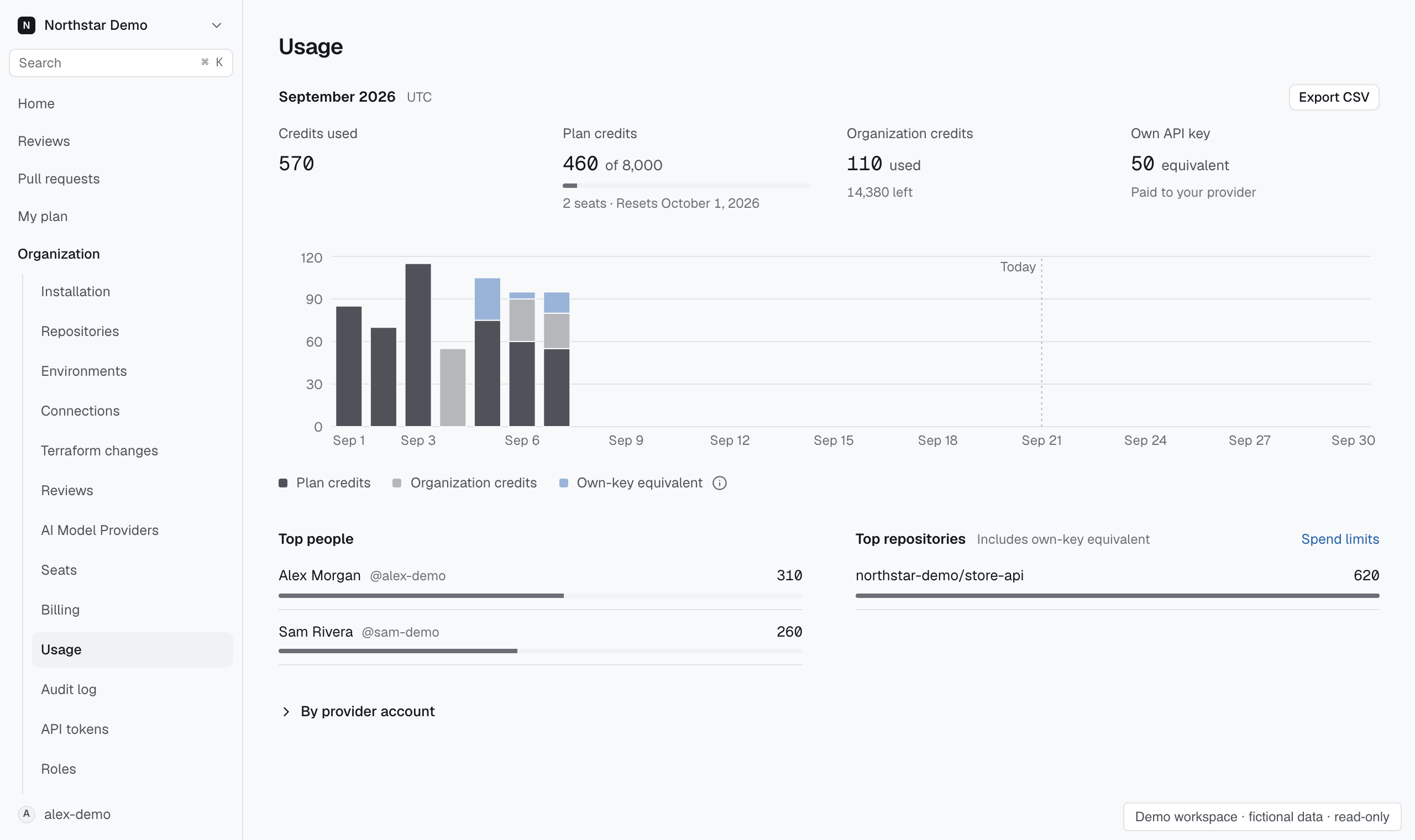
Read monthly spending#
The top of Usage shows the current month’s credits used, plan credits against the seats’ combined allowance, organization credits used and left, and own-key usage.
Credits used counts plan and organization credits. Own-key usage appears separately as a credit equivalent and spends no Proofline credits. The daily chart shows all three sources across the month; its legend names each one.
Top people and Top repositories show who and what used the most. Repository amounts include own-key usage. A repository at its spend limit shows Limit reached. Unattributed usage is shown separately when it cannot be assigned to a repository.
Open By provider account for the account and model provider behind each amount. Administrators who manage billing can download the month’s charges with Export CSV.
Investigate a change#
Compare the spending period with review activity for the affected repositories. Check whether automation, author activity, or review settings changed.
Use Reviews to inspect the underlying work before changing limits. A high total alone does not explain why reviews used those credits.
Use Seats for each developer's plan and Reviews → Automation for the maximum credits per review. Use Billing to check the available balance.
Set monthly spend limits in Billing.