
Configure the semantic index
The semantic index lets reviews find code related by meaning within a pinned repository revision. An organization administrator must opt in before source code reaches an embedding provider.
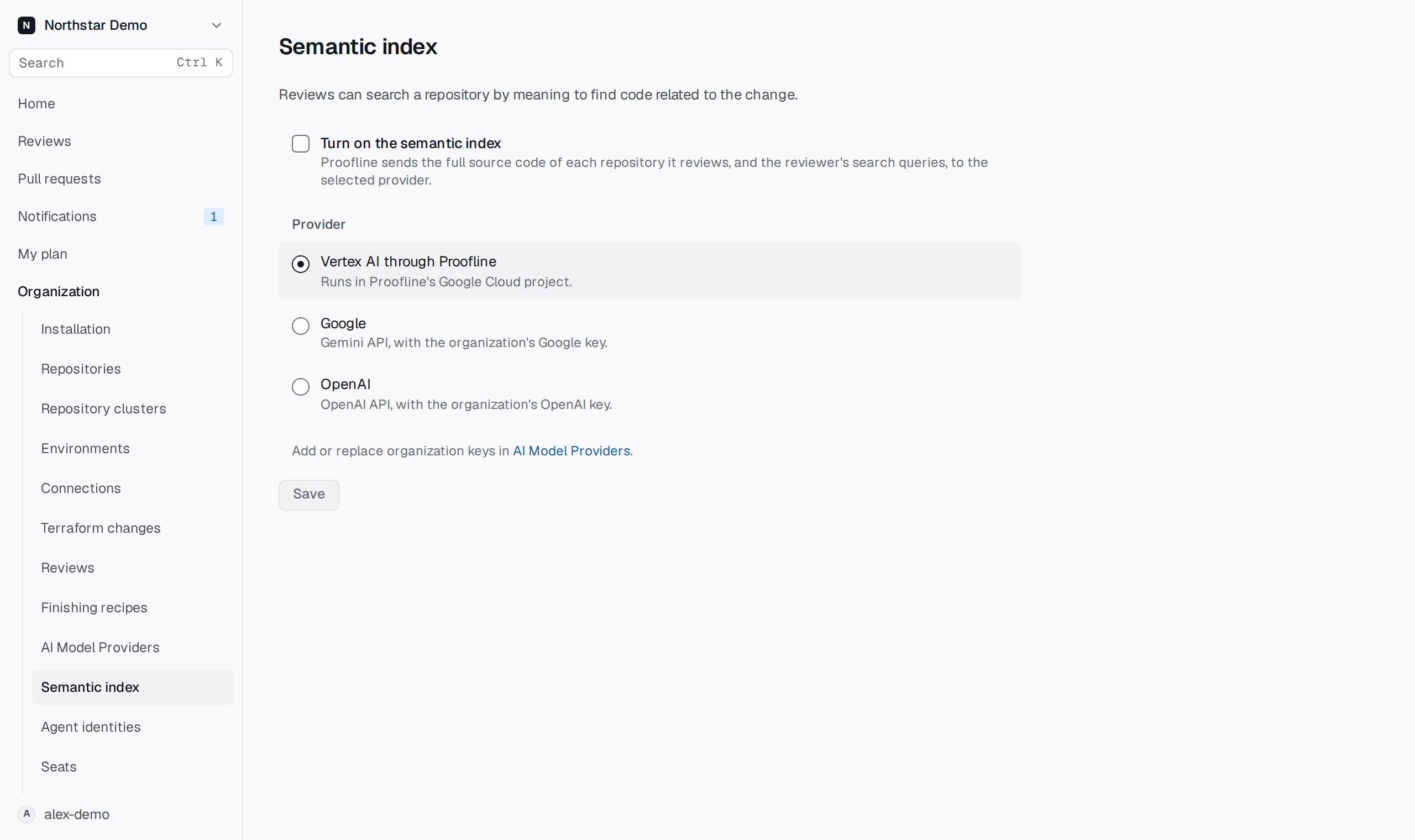
Choose a provider#
- Open Organization → Semantic index.
- Read the disclosure under Turn on the semantic index.
- Select the checkbox and choose a Provider.
- Select Save.
The setting starts off. Enabling it permits Proofline to send the full source code of reviewed repositories and reviewer search queries to the selected provider.
Vertex AI through Proofline uses Proofline's Google Cloud project when available on the deployment. Google and OpenAI use the organization's corresponding keys. Add or replace those keys in AI Model Providers.
Understand the result#
Index builds and searches use exact repository revisions. Search returns candidate locations for the reviewer to read. A match alone does not support a finding; the reviewer still needs source or environment evidence.
An unavailable or partial index remains a limitation. Turning the setting on does not establish that every repository already has a complete index.
To stop further indexing and semantic queries, clear Turn on the semantic index and select Save. An unsuccessful save keeps the draft and shows the server's reason; check that the saved setting reflects your choice.