
Check your plan and usage
Open My plan in the sidebar to see the plan your seat is on in this organization and the credits you have used.
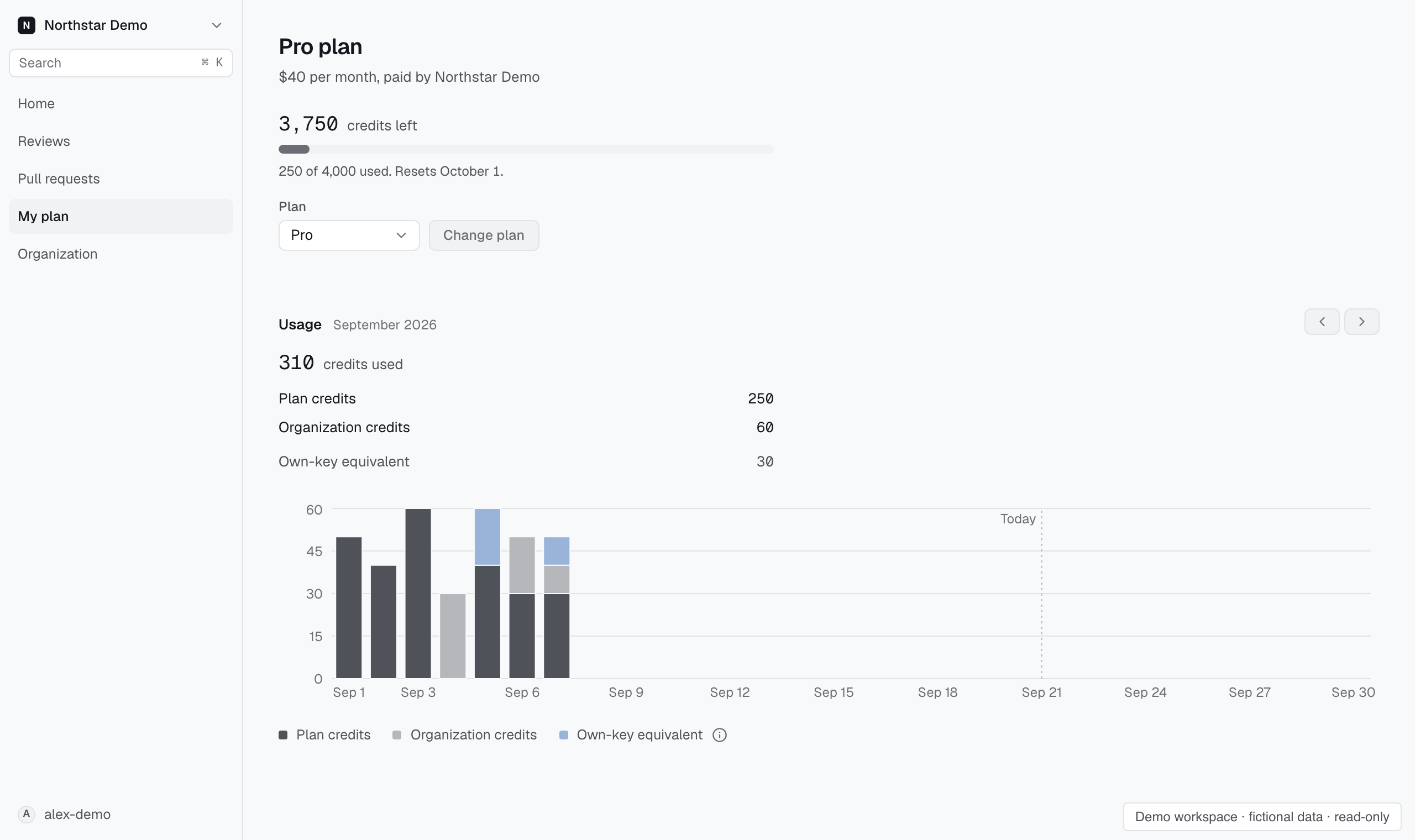
Read your plan#
The page title names your plan. Below it are the credits you have left this month, how many you have used, and the date the plan resets. If your seat started or moved to a larger plan during the month, this month's credits cover the days left. Unused credits do not carry over.
If the page says No plan in this organization, you have no seat with a plan. Ask an organization administrator to assign one.
When your credits run out#
When you use up your plan's credits, the page says what happens to new reviews of your pull requests:
- they continue on organization credits, when your seat allows it;
- otherwise they do not start until the plan resets.
A review that is already running finishes either way. To keep reviewing this month, ask an organization administrator to allow organization credits for your seat or to move you to a larger plan.
Change your plan#
If you may manage seats, choose a Plan and select Change plan. The line under the control says what the plan costs and when it applies: a larger plan applies now, with the price difference and the extra credits both counted for the rest of the month, and a smaller plan applies at renewal.
Otherwise, ask an organization administrator to change your plan. The organization pays for it.
Review your usage#
Usage shows daily usage funded by your plan, by organization credits, or by your own provider key. Own-key usage shows its credit-equivalent cost and spends no Proofline credits.
Use the arrows to move between months, back to the first month you have usage in.