
Read and act on a finding
A finding connects a code change to a failure mechanism and the evidence that supports it. Verify that explanation before changing the code.
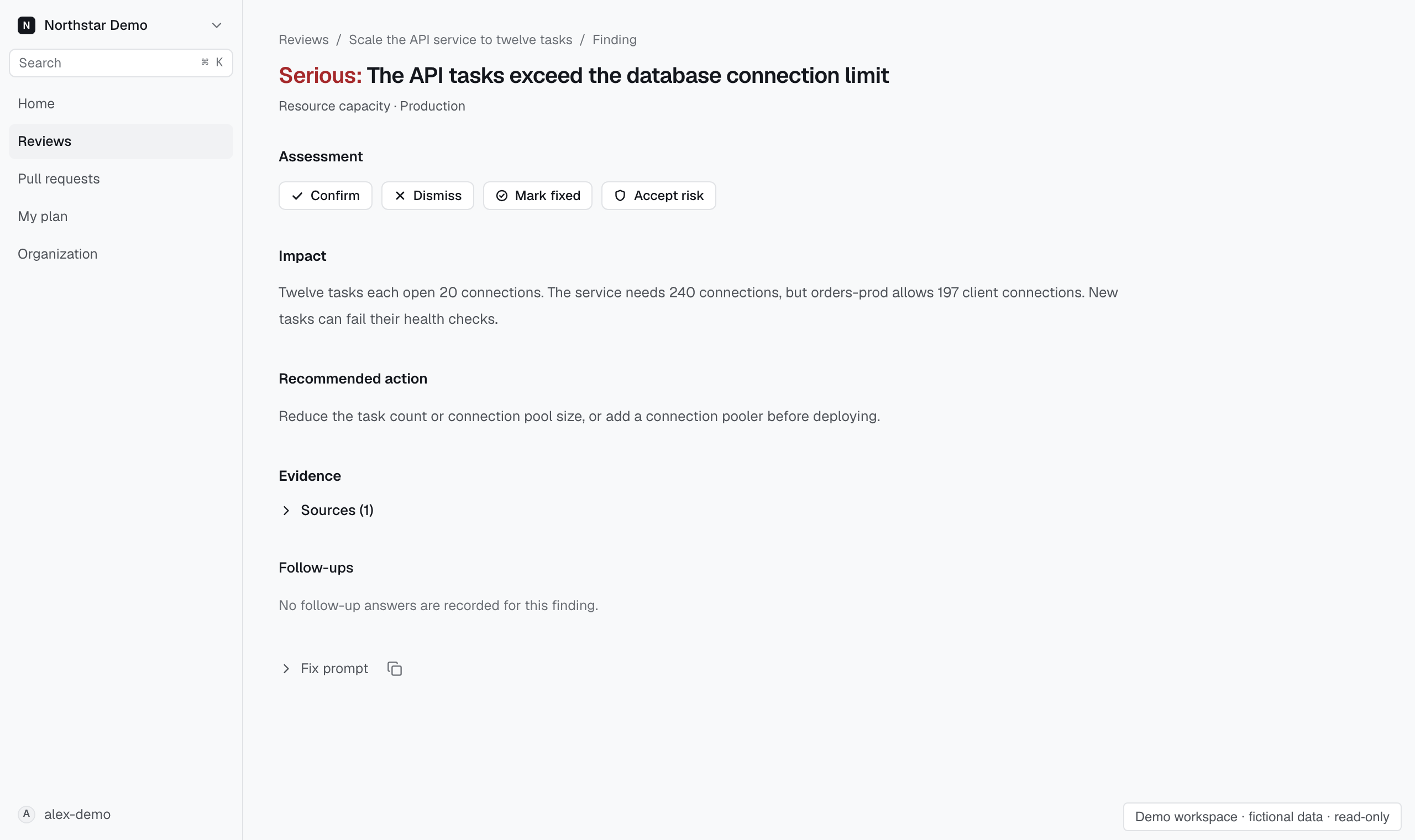
Inspect the explanation#
- Open the finding from its review.
- Read the affected code and the failure mechanism.
- Inspect the supporting evidence and its environment.
- Compare the suggested correction with your intended deployment behavior.
The line under the finding's title names what kind of proof it rests on. Environment evidence means a recorded fact about your infrastructure supports it. Experiment means a read the sandbox recorded supports it. Code only means the finding is argued from the code alone, so weigh it accordingly.
Use View comments on GitHub when you want to discuss the finding in the pull request.
Use the fix prompt#
Expand Fix prompt to use the recorded finding with a coding agent. The prompt asks the agent to verify the finding before editing.
Copy the prompt for any agent, or use a launch form: copy the Claude Code or Codex command and paste it into bash or zsh in your checkout, or select Open in Cursor. Cursor is not offered for a prompt too long for its links.
A recorded finding describes a particular change and evidence set. Check that it still applies to the current code before accepting a proposed fix.
Verify the correction#
Review and test the resulting code through your normal workflow. Run a new Proofline review to assess the updated change.
The earlier finding remains part of the review history. A later review provides a new result rather than rewriting the original evidence.