
Read a deploy's verification
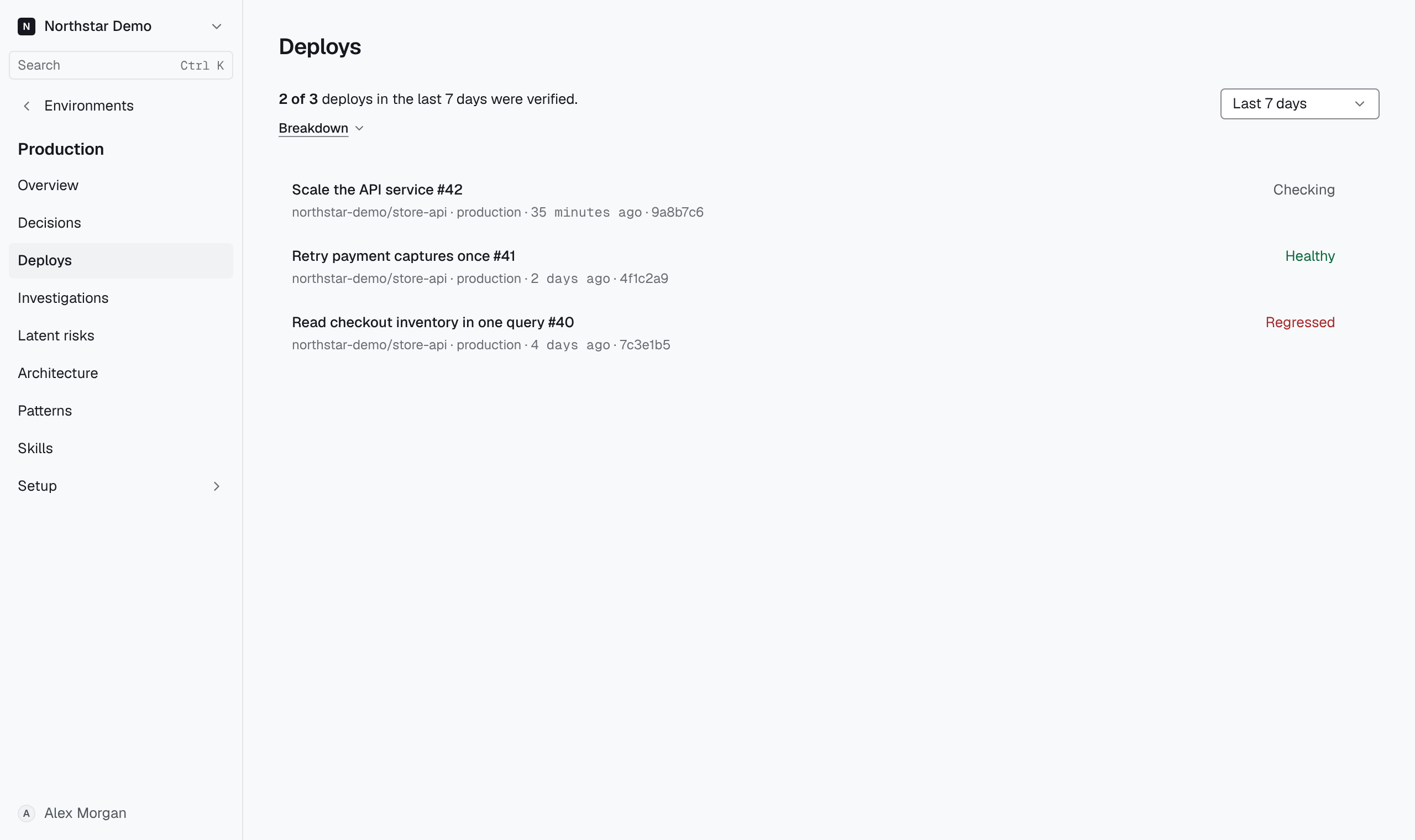
Open an environment's Deploys tab to see how many recent deploys Proofline verified, then open a deploy to read its signals and checks. A verified deploy is one whose four checks read the running commit and every watched signal. It does not mean the deploy is safe, and a deploy whose signals got worse can still count as verified.
Before you start#
The tab lists the deploys the environment's linked repositories delivered, and verification starts when a deploy lands. Its checks can complete only when the environment watches at least one signal and can read the deploy's runtime. Turn on the production loop for AWS sets this up for an AWS environment.
Read the window#
- Open Environments and select the environment.
- Select Deploys in the environment sidebar.
- Choose Last 7 days, Last 30 days or Last 90 days under Window.
The first line counts the window's verified deploys out of every deploy it holds, such as 9 of 22 deploys in the last 7 days were verified. Deploys verified until replaced count as verified. The line also says how many verified deploys had a change-check gap, and how many deploys had no signal to watch. An administrator also sees the setup step that most of the window's gaps need beside Breakdown, such as Choose signals.
Select Breakdown for the count in each state below. When the window holds deploys of more than one GitHub Environment, or AWS CodePipeline executions or AWS Amplify jobs, Breakdown also shows how many of each group's deploys were verified. A deploy belongs to the window that holds its landing, or its first recorded status when it never landed. With more than one group, choose one under Deploy group to list only its deploys, or All deploys to list every one.
Deploys follow, newest first. Each is named by its pull request's title, else its commit's title, else its short commit. Below the name are the repository, the GitHub Environment and job or the AWS run that delivered it, when it landed and its short commit. A change delivered by several jobs has one deploy for each job. Select a deploy to open its page. The button below the list loads 25 more deploys at a time.
Tell the states apart#
Breakdown counts each deploy in one state. The status at the end of a deploy's row uses a shorter label for the same state.
| Breakdown | Deploy's status | What it means |
|---|---|---|
| Verified at all four checks | Healthy | All four checks read the running commit and every watched signal. |
| Verified until replaced | Healthy until replaced | A later deploy replaced this one after its landing check, and every check before then read the running commit and signals. The later deploy's checks cover the time after. |
| Not set up | Not set up | The environment watched no signal when the deploy landed, so its checks could only end incomplete. |
| Incomplete | Checks incomplete | A check could not establish what it reads. The row names each gap, such as Runtime inventory out of date. |
| Check not recorded | Check not recorded | A check came due, or verification ended, without a result. |
| Landed without verification | Not verified | The deploy landed, and this environment did not verify it. |
| Replaced before it was checked | Replaced | A later deploy replaced this one before it was checked. |
| Checks not yet due | Checking | Verification is running, and its next check has not come due. |
| Deployment failed | Deploy failed | The GitHub deployment's latest status is failure or error; it never succeeded. |
| Inactive, never seen landing | Never landed | The deployment was only ever reported inactive. |
A deploy whose checks recorded a regression reads Regressed, whatever its state. Only Deploy failed outranks it, so a deploy never reads healthier than its checks. Breakdown still counts a regressed deploy by what its checks read, so a regressed deploy whose checks read every signal counts as verified.
Read a change-check gap#
A deploy's change check is the review that covered the deployed code, such as the pull request's review. A change-check gap means no review covered the code, or the review that did completed no environment assessment: No change check, Change check incomplete or Environment not checked. A deploy with only change-check gaps still counts as verified, because its own checks read the running commit and signals. Verified with a change-check gap in Breakdown counts these deploys, and their rows name the gap.
A verified deploy with a change-check gap says nothing about the environment beyond its signals. Its review did not check the environment, and the deploy's own checks do not replace that assessment.
Read a deploy#
A deploy's page leads with its status, when it landed, its repository and how it was delivered, with links to its pull request and commit. Change-check gaps follow, named once for the whole deploy. When the deployed pull request was not reviewed, the page names it and says why.
Signals lists each watched signal's value in the hour before landing and at each check, and marks a regressed value in red. Once the 1-day check has read, Day before shows the value it compared with. Without a signal reading, the page leaves this section out.
Checks lists the four checks with each result: Healthy, Regressed, Incomplete or Superseded, and when each read. A check without a result reads Pending, or Not recorded once verification has ended. Each check names the gaps it found under it. The checks read consecutive windows after landing:
| Check | Reads | Compares with |
|---|---|---|
| At landing | The first 5 minutes | The hour before landing |
| 20 min | 5 to 20 minutes | The hour before landing |
| 1 hour | 20 minutes to 1 hour | The hour before landing |
| 1 day | 1 hour to 1 day | The same hours one day earlier |
Each check reads a few minutes after its window ends. A landing check that finds no runtime inventory collected since landing reads again about 15 minutes after landing. A signal regresses when its value moves past the signal's Tolerance (%) and Minimum change in the direction set by Worse when.
When a request signal regressed and the check read its service's request log, the routes follow that check under Failing routes on and the service's name. Window and Revisions say which minutes the check read and which of the service's revisions of the deployed commit served them. Each row is a route's method and path with its Requests, its Server errors and the requests Cloud Run ended At timeout; a request ended at the timeout counts as a server error too. The check lists at most five routes that answered a server error: those that ran to the timeout first, then the rest by server errors. A path shows {id} in place of numbers and IDs. When the read recorded no route, the check says why, such as Request log too large for one read. The routes never change a check's result.
Below the checks, the page links the review that covered the deploy. Covered by names a review that checked the environment; any other review is linked to open it. When the deployment failed after it landed, or the running revision serves a different commit, the page says so. When a later deploy replaced this one, it names the later commit. An administrator also sees the setup steps that would close the deploy's gaps.
The page refreshes every minute while verification is still running.
Read what a gap leaves unestablished#
A gap means a check could not establish what it reads, such as which commit is running or a signal's value. A check with a gap beyond its change check is incomplete, whatever else it read, and the deploy counts as Incomplete. A regressed check with such a gap still reads Regressed, and Breakdown counts its deploy as Incomplete.
A quiet check establishes only that the signals it read stayed within tolerance in its window. It does not establish that the deploy is safe, that other services are unaffected, or anything about a signal the environment does not watch.
Find a regression report#
When a deploy regresses, Proofline reports it once. A failed deployment, or a running revision that serves a different commit, reports from any check. A signal regression usually reports from the 20-minute check on, because a new revision's cold start can move the first minutes past tolerance. A landing check reports a signal regression only when higher values are worse and the reading is at least ten times the value at which the signal regresses. Any other landing check whose only regression is a signal records Regressed and reports nothing until a later check finds a regression too.
The report names the deploy's commit, the environment, the earliest check that may report and what regressed, and links the deploy's page. When a request signal regressed and the check read the service's request log, the report also names the failing routes. It goes to three places:
- Reviews → Notifications, as Deploy regressed after it landed, for members who can write to the repository. Reports from one environment that describe the same regression share one row; open it to list each deploy.
- GitHub: a comment on the pull request whose review or merge covered the deployed commit. Without one, a failed Proofline deploy verification check on the deployed commit. In shadow mode, nothing is posted to GitHub.
- The organization's Slack delivery channel. Set up Slack delivery chooses it; without one, nothing is posted to Slack.
Each channel is delivered independently, so a Slack failure does not delay the notification or the GitHub comment.
Once a report goes out, the deploy's page lists where it went under Regression report, below the checks. Each of GitHub, Slack and Notifications that recorded a receipt has a row with when it was recorded. A GitHub row links the pull request comment or check run. A channel that did not post the report reads Not delivered with the reason, such as No Slack channel is connected. A channel with no receipt has no row, and a deploy that reported nothing shows no Regression report.