
Comment on repository issues
Proofline can post one comment on each new or edited issue in a repository. The comment lists possible duplicates, pull requests that reference the issue and suggested assignees. Proofline adds no labels while label suggestions are being calibrated. It never assigns anyone, removes a label or quotes the issue's text.
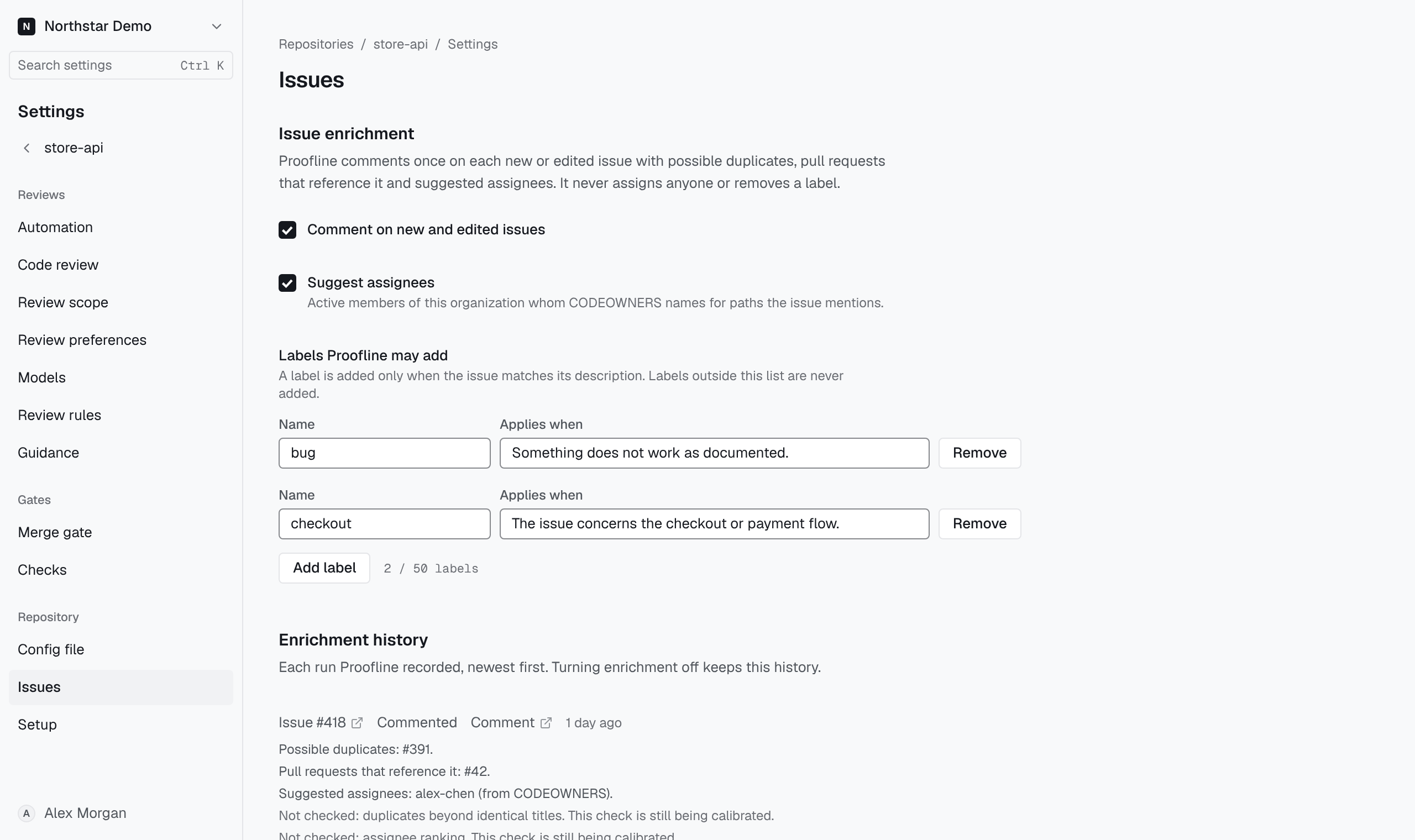
Turn issue comments on#
- Open the repository's Settings → Issues page.
- Select Comment on new and edited issues.
- Select Suggest assignees to list assignees in the comment.
- Optionally, list the labels Proofline may add, as described below.
- Select Save issue enrichment.
Every member can read these settings. Only an organization administrator can change them, and each change is recorded in the audit log. The settings cannot change while the repository is archived on GitHub, while Proofline has lost access to it or while the organization is read-only.
What Proofline posts and when#
Proofline comments when an open issue is opened, reopened or has its title or description edited. An edit that changes only whitespace, or only the capitalization of the title, starts nothing. Each issue gets one comment, which Proofline edits when it runs again for the same issue.
The comment can list:
- open issues with the same title, as possible duplicates;
- pull requests in the repository that reference the issue;
- suggested assignees, when Suggest assignees is on.
Assignee suggestions come from the repository's CODEOWNERS file on its default branch. Proofline suggests active members of the organization whom CODEOWNERS names for the paths the issue mentions. An issue that mentions no owned path gets no suggestion.
Allow labels#
Under Labels Proofline may add, select Add label. Enter the label's Name and, in Applies when, the condition an issue must meet, such as "The issue concerns the checkout or payment flow." Each label is listed once, and every listed label needs a name and a description. Select Remove to drop one.
Proofline saves the list but adds none of these labels while label suggestions are being calibrated, so each run's history shows Not checked: label suggestions. Labels outside the list are never added.
Read the history#
Enrichment history lists each run, newest first, with a link to the issue and, once posted, the comment. A run shows Commented, Not commented: enrichment was off or Not commented: the issue changed again, followed by what the comment listed.
A Not checked line names a check that did not run for that issue and its cause. Without it, the comment falls back to identical titles for duplicates and CODEOWNERS for assignees, and no label is added. Turning comments off keeps the history.