
Implement a plan
Proofline can write an approved plan version into the repository in a sandbox, check each part of the change, and then open draft pull requests when you ask. Nothing reaches GitHub until you select Open draft pull requests, and nothing is marked ready or merged.
Before you start#
- The plan exists on the repository's Codebase page. Build and read codebase pages explains how to create one.
- You have write access to the repository on GitHub. Approving a version and starting an implementation both need it.
- An organization administrator has turned on plan implementation. While it is off, an approved version's Implementation section says Plan implementation is off for this organization, and an administrator can select Turn on plan implementation there.
Approve a version#
- Open the repository's Codebase page and select the plan under Plans.
- Read the version's open questions and unknown prerequisites.
- Under Implementation, select each open item to acknowledge it.
- Select the approve button, such as Approve version 2.
An approval names that exact version. If you ask for a new version, approve it separately before implementing it.
Start the implementation#
Under Implementation, select the implement button, such as Implement version 2. Proofline opens the attempt's page. Each part of the change is written and validated at the plan's commit and uses credits. A repository runs one attempt at a time; while one runs, the section says An attempt is running.
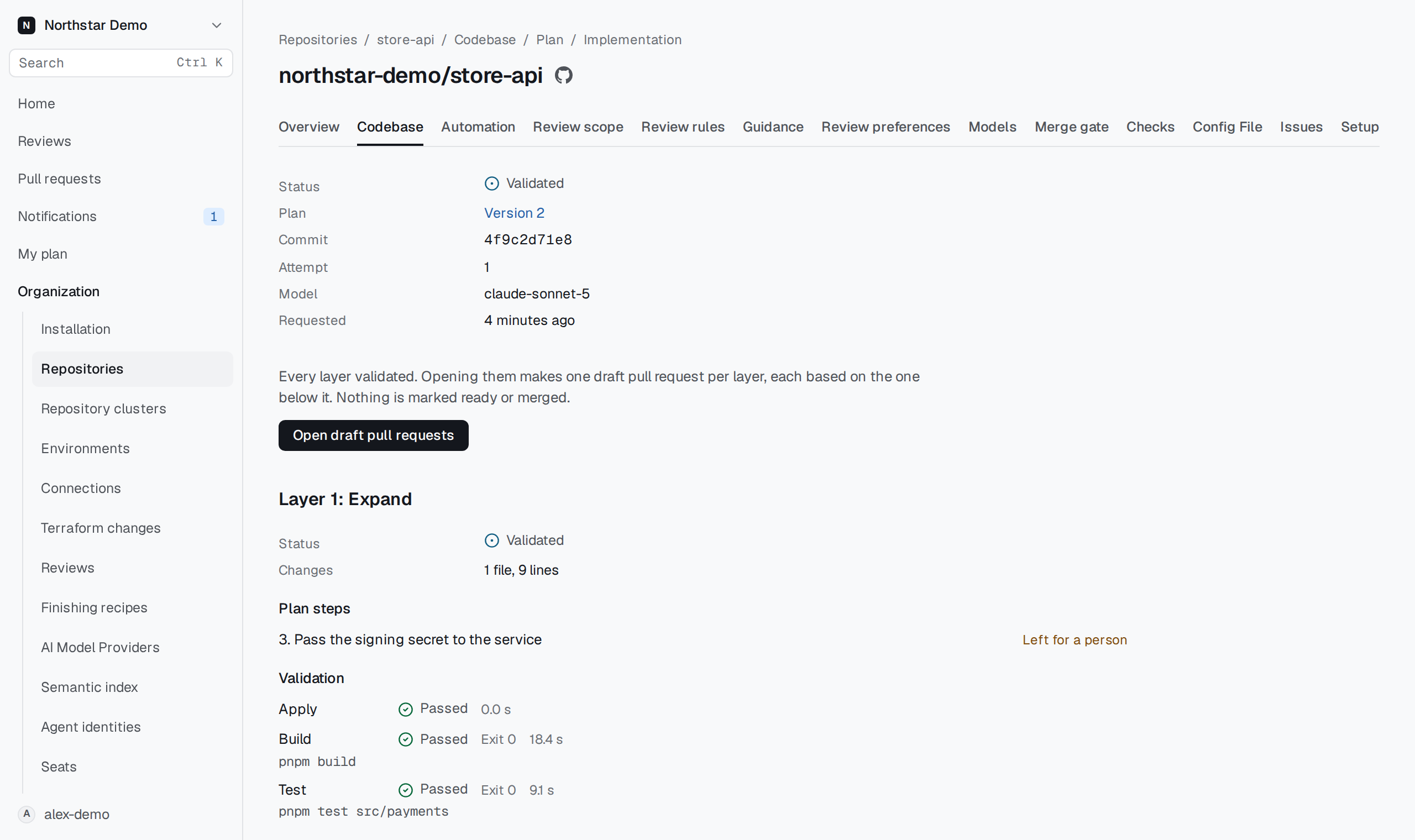
Proofline splits the plan's steps into up to three layers, such as Layer 1: Expand and Layer 2: Application, and writes them in order. For each layer, the attempt's page shows:
- its status and how many files and lines it changed;
- Plan steps, each marked Carried out, Not carried out, Not checked or Left for a person;
- Validation, with each step's result, such as Build or Test, and its command;
- Sandbox summary and the layer's Diff.
Activity lists what the sandbox did, as notes, commands, tool calls and file changes.
Treat the summary, diff and commands as text the model and the repository produced. Check them before you open pull requests.
Open the draft pull requests#
When every layer validated, the attempt's Status reads Validated. Select Open draft pull requests. Proofline opens one draft pull request per layer, each based on the one below it, and links each one from its layer. Review and merge them on GitHub as you would any change.
When an attempt does not validate#
This attempt did not validate names why. A layer that fails validation stops the layers above it, and nothing from that attempt can be opened as pull requests. Read the layer's validation results and Activity, then revise the plan or select the implement button again for a new attempt. After an attempt validates, the button reads Implement again.
This attempt was stopped means the attempt ended before it finished.