
Find out why a latent-risk scan was deferred, refused or incomplete
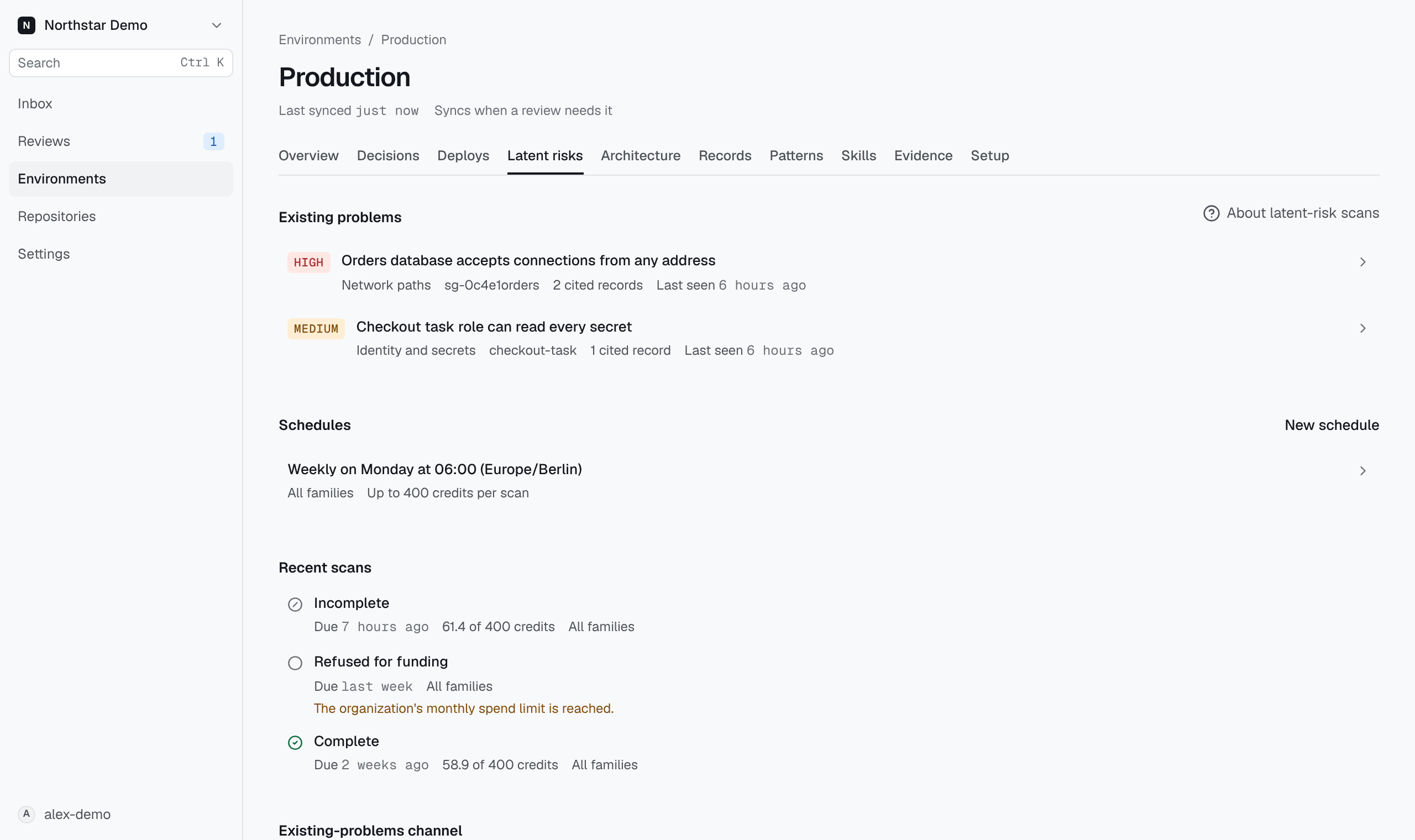
On the environment's Latent risks page, look under Recent scans for the scheduled or requested time. Use the status to determine whether a scan started and whether it examined every selected family.
Read the recorded outcome#
Each scan shows its outcome and when it ran. A scan that started nothing shows when it was due, or when you requested it.
- Complete: every family was examined without a gap. Other problems can still exist.
- Incomplete: at least one family has a gap or was not examined.
- Running: the scan has not recorded a result yet.
- Deferred: the schedule's previous scan was still running, so nothing started.
- Refused for funding: the organization's spend limit refused the scan, so nothing started. The reason appears under the outcome. Check usage and billing, then wait for the next scheduled time.
A scan does not list its evidence gaps or the families it did not examine. When an administrator can close a gap, such as a missing cloud connection, an administrator sees it above Recent scans with the step that closes it, and the Inbox lists it as a setup task; see Clear Inbox setup tasks. Select Families under a finished scan to see each family's model requests and queries and the number of problems it reported.