
Refresh an ended audit and read its earlier findings
A refresh audits a newer commit of the same repository and relates each finding of the earlier audit to that commit. It reuses a finding whose code did not change, rechecks one whose code did, and keeps every finding it could not examine as found by the earlier audit. An earlier finding never disappears from a refresh and never reads as resolved.
Before you start#
- The audit has ended, however it ended. A running audit offers no Refresh; stop it or let it end first.
- Audits are on for the organization.
- You have write access to the repository. Without it, Refresh is unavailable and the report says that refreshing an audit needs write access.
- The branch, tag or commit you refresh at is pushed and is not the commit the earlier audit read.
Start a refresh#
- Open the ended audit's report from the repository's Audits list.
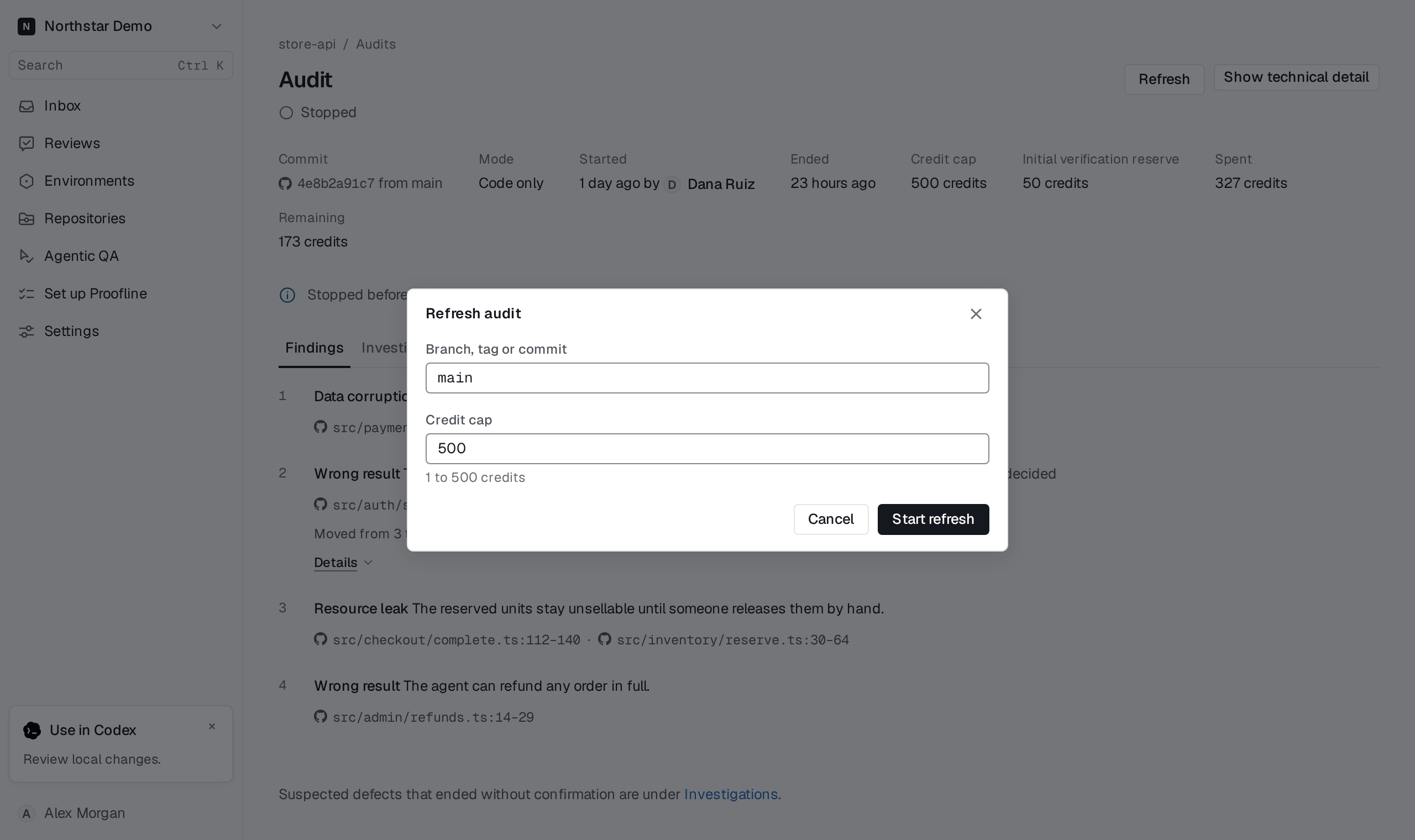
- Select Refresh. Refresh audit opens.
- Under Branch, tag or commit, keep or replace the branch or tag the earlier audit came from, or enter a full commit SHA. A branch or tag is read as the commit it points to when the refresh starts, as for any audit.
- Under Credit cap, enter a whole number within the range shown under the field. It starts at the earlier audit's cap, or at the most one audit may be given if that is lower.
- Select Start refresh. The new audit's report opens.
A refresh starts without a plan to review. It keeps the earlier audit's mode, and an infrastructure-aware refresh checks the same environments.
If GitHub cannot find the branch, tag or commit, the form says so beside the field; check that it has been pushed. A refresh at the commit the earlier audit read is refused: choose a newer one. If the organization has no credits left, the form says so and links to billing.
What a refresh spends#
A refresh is a whole audit of the newer commit with the same cap, spending and spend limits as an audit you start from the Audits list. It examines the commit's areas for new defects as well as the earlier findings.
Within that cap, an earlier finding whose code did not change is carried without spending anything. Each one whose code changed gets a recheck, and the rechecks are funded first, before any new investigation, from the part of the cap not held back for verification. A refresh rechecks at most 16 earlier findings. When the cap cannot fund a recheck, or a refresh reaches 16, the refresh ends incomplete, and its report counts the earlier findings it did not recheck and why.
Find the audit it refreshes#
The new report's facts include Refreshes, which links the earlier audit by its commit and says when it started. In the repository's Audits list, the refresh's row says which audit it refreshes and links it. A refresh of a refresh links only the audit directly before it; each earlier finding then names the audit that confirmed it.
Read the earlier findings#
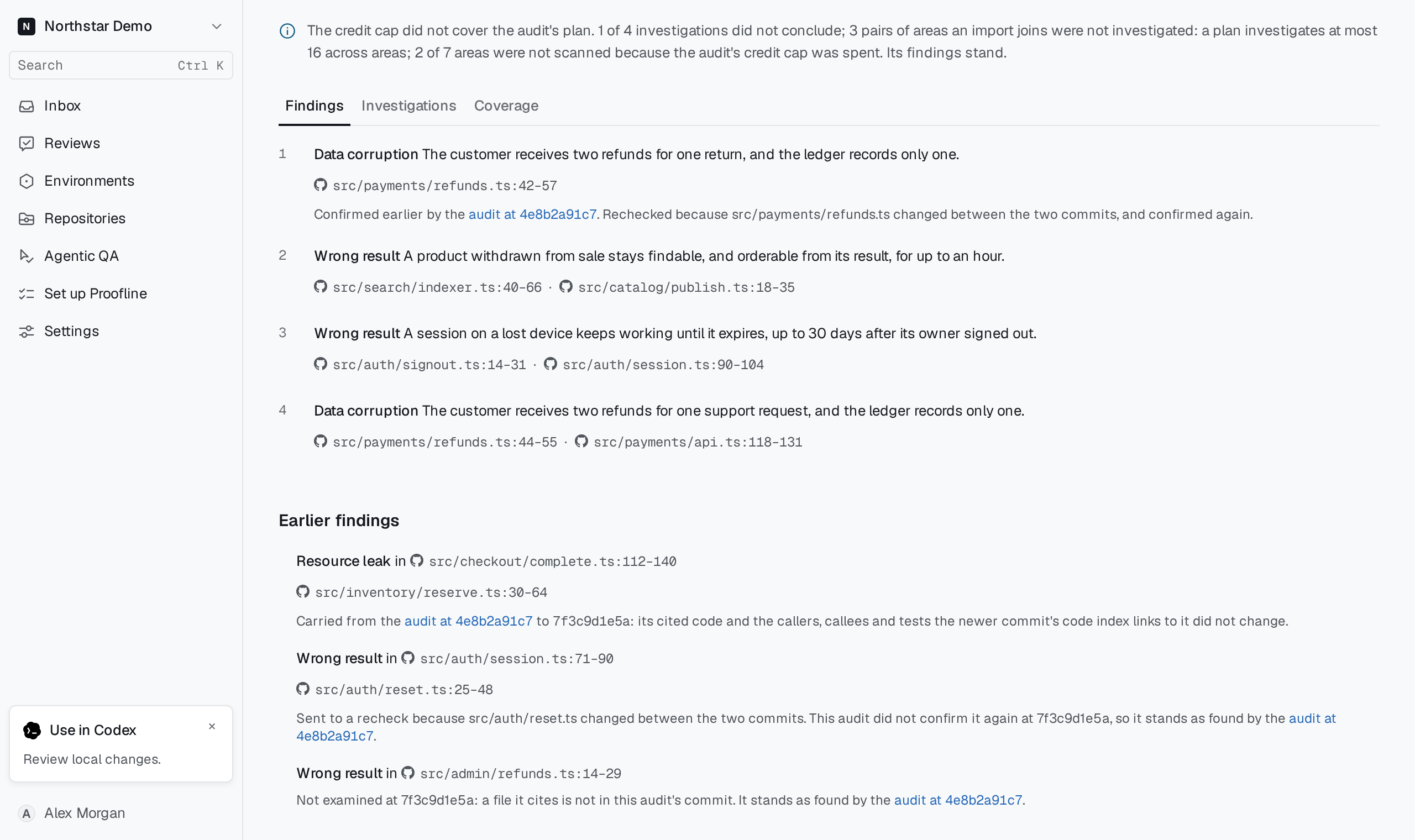
Under Findings, the refresh ranks its own findings. A finding of the refresh that confirms an earlier finding again says so beneath it:
- Confirmed earlier by the audit at … Rechecked because …, and confirmed again. The earlier finding's code changed, and the recheck found the same defect.
- Confirmed earlier by the audit at … Its code had not changed, so no recheck ran, and this audit found it again. The finding was carried, and the refresh's own investigation found it again.
- Confirmed earlier by the audit at … This audit found it again, although … The refresh did not recheck the earlier finding, for the reason that follows, but another of its investigations found the same defect.
The other earlier findings are listed under Earlier findings, below the ranked findings. Each row names the defect and its cited code at the commit of the audit that confirmed it, then one of these:
- Carried from the audit at … to … The cited code and the callers, callees and tests the code index links to it did not change between the two commits, so the finding carries to the newer commit without a recheck. In a refresh of a refresh, the row first names the audit that confirmed the finding, then the two commits compared. With Show technical detail selected, the row lists those callers, callees and tests at each commit.
- Rechecked because …, and confirmed again at … The refresh confirmed the defect again by a finding that was later merged into another or withdrawn, so no ranked finding shows it.
- To be rechecked at … because … The code changed, and the recheck has not finished. This appears while the refresh runs.
- Sent to a recheck because … This audit did not confirm it again at …, so it stands as found by the audit at … The recheck ended without confirming the defect. That is not evidence of a fix: the finding stays as its earlier audit confirmed it.
- Not examined at …: followed by the reason, then It stands as found by the audit at … The refresh did not look at the finding, so it neither confirms nor clears it.
A finding is not examined when the refresh's cap could not cover its recheck, when the refresh had already rechecked 16, or when the recheck did not finish: it was still running, the audit stopped or ended first, or the recheck ran out of turns or credits, lacked evidence it needed, would have exceeded the model's context window or left a possible finding undecided. It is also not examined when none of the code it cites is in the refresh's areas, when a file it cites is not in the newer commit, or when the specialist that found it no longer runs.
One reason means the finding was not rechecked by this audit on purpose: an earlier refresh rechecked it without confirming it again, and its code has not changed since. Another recheck of the same code would repeat that result, so the finding stays as found by the audit that confirmed it until its code changes.
An earlier finding stays in every later refresh until one confirms it again. Each audit at … link opens the audit that confirmed it, where its evidence and history remain.
A refresh or a new audit#
Starting a new audit of the same branch from Start audit reads the branch's current commit but relates nothing to earlier audits. It reports only what it confirms itself, so a defect an earlier audit confirmed and the new one does not reach is simply absent from its report, with no sign that it was ever found. It does let you plan first and see what the cap funds.
Refresh an audit when you want the newer commit's report to keep account of what the earlier audit found. To tell audits of the same branch apart, see Compare repository audits started from the same branch. To refresh after pushes to a branch without starting each refresh yourself, set up an audit cadence; a refresh you start from the cadence's newest audit at its branch counts as the cadence's.