
Name the GitHub workflows that publish release artifacts
Select the exact GitHub Actions workflows that publish release artifacts for a delivery target. The selection belongs to the target's GitHub Environment mapping.
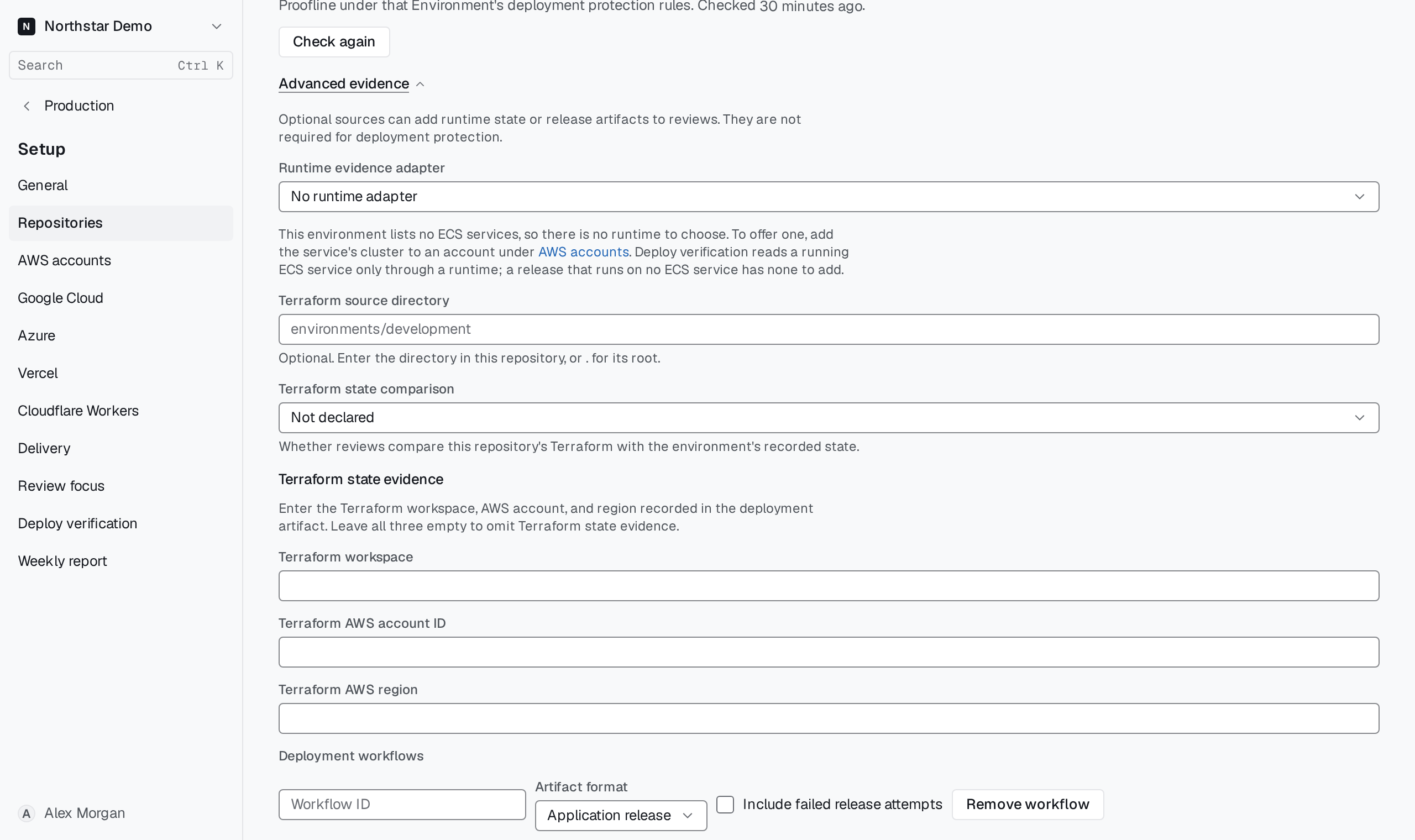
Select the workflows#
You need organization administrator access to save the selection.
- Open the environment's Setup → Repositories page and select the repository that deploys to it.
- Under Deployment protection, find the target with the GitHub deployment environment you want. If the target uses a GitHub Environment and has no mapping yet, use Add GitHub environment mapping and choose the exact environment.
- Open Advanced evidence and find Deployment workflows.
- Select Add exact workflow.
- Enter the numeric Exact GitHub workflow ID for an active workflow in this repository. Use each workflow ID once per mapping.
- Set Artifact format to Application release or Release set, matching the artifact the workflow publishes. For Application release, select Include failed release attempts if those attempts should supply evidence. Choosing Release set clears and disables that option.
- Select Save on the repository page.
Use Remove workflow on a row and save to remove its selection from the target. If Proofline refuses a workflow ID, confirm that it belongs to an active workflow in the linked repository. To check the separate protection rule on GitHub, see Verify the GitHub protection rule on a delivery target.