
Open, retry or discard a Terraform change's draft pull request
Open a draft pull request for a repository after reviewing its generated files. To leave the files on the change for reference, discard that repository's proposal before authorizing publication.
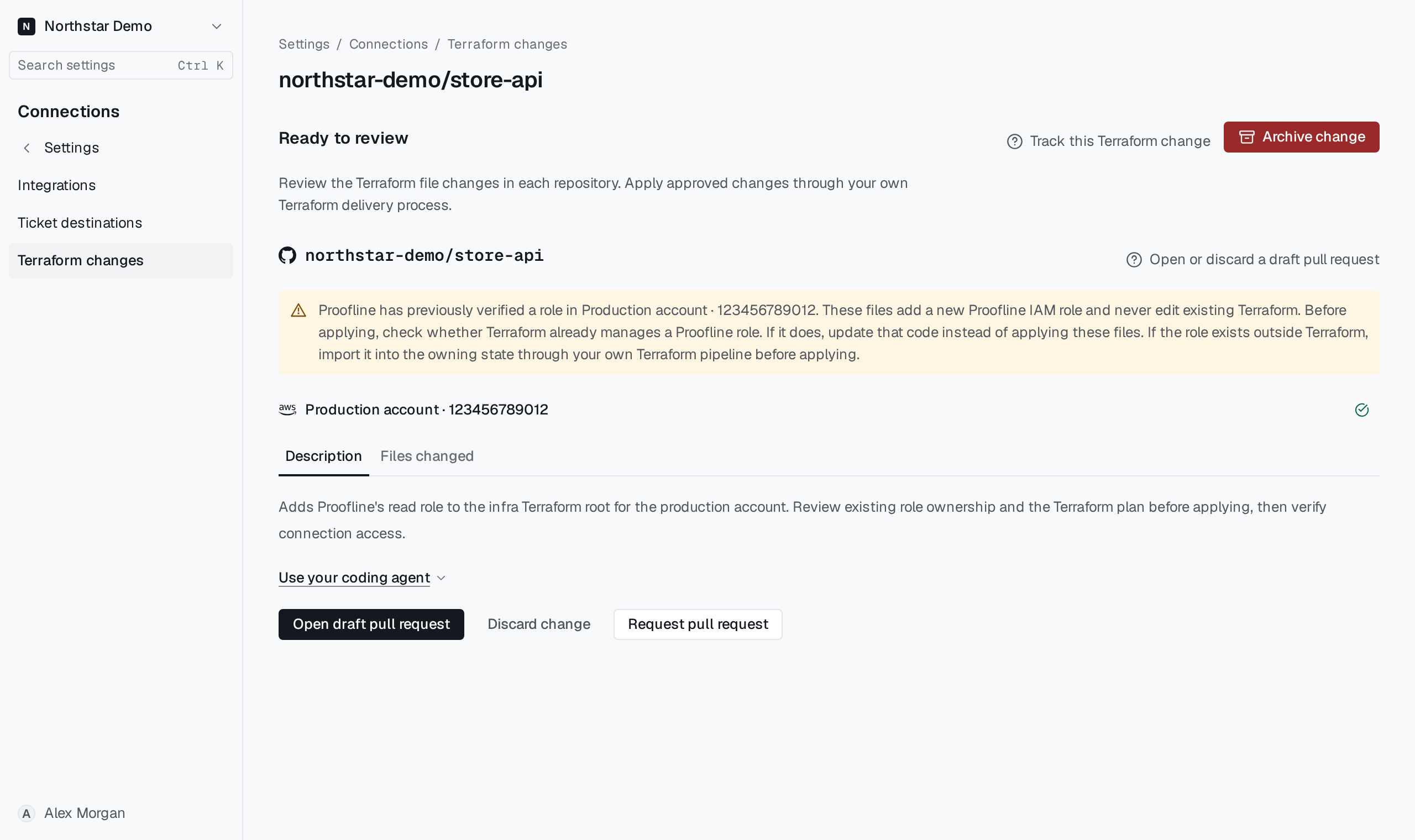
Open or retry the draft#
- In Terraform changes, open a prepared change and review the proposed files for the repository.
- Select Open draft pull request in that repository's section. An organization administrator with GitHub write access to the repository can open it here. Other teammates can request publication.
- When the draft opens, follow its link to GitHub and use your team's review and apply process.
If opening the pull request fails after you authorize it, the repository section shows the reason and offers Retry opening draft pull request. Fix the reason before retrying. If the access check refused publication before it was authorized, use Open draft pull request again after the repair.
Repair GitHub App access#
Use the action next to the error for that repository.
- Add this repository to followed by the App's name means the App is installed and the repository is outside its selection. Add the repository in the linked installation settings.
- If the change asks you to review the App installation, follow that link to its settings. Use the reason on the change to decide what to correct.
- Install followed by the App's name opens the GitHub installation flow. Install it for the organization and include the repository.
Discard the proposed files#
Before authorizing the repository's draft, select Discard change in its section. Change discarded. These files will not be published. confirms the choice. Other repositories in the same change keep their own proposals.