
Find out why a QA run has no video
Open the run's Details tab and check Video to see whether capture started, whether Proofline still has the video and whether your browser can play it. If video was never requested, the row is absent. For future runs, check the setup's recording options.
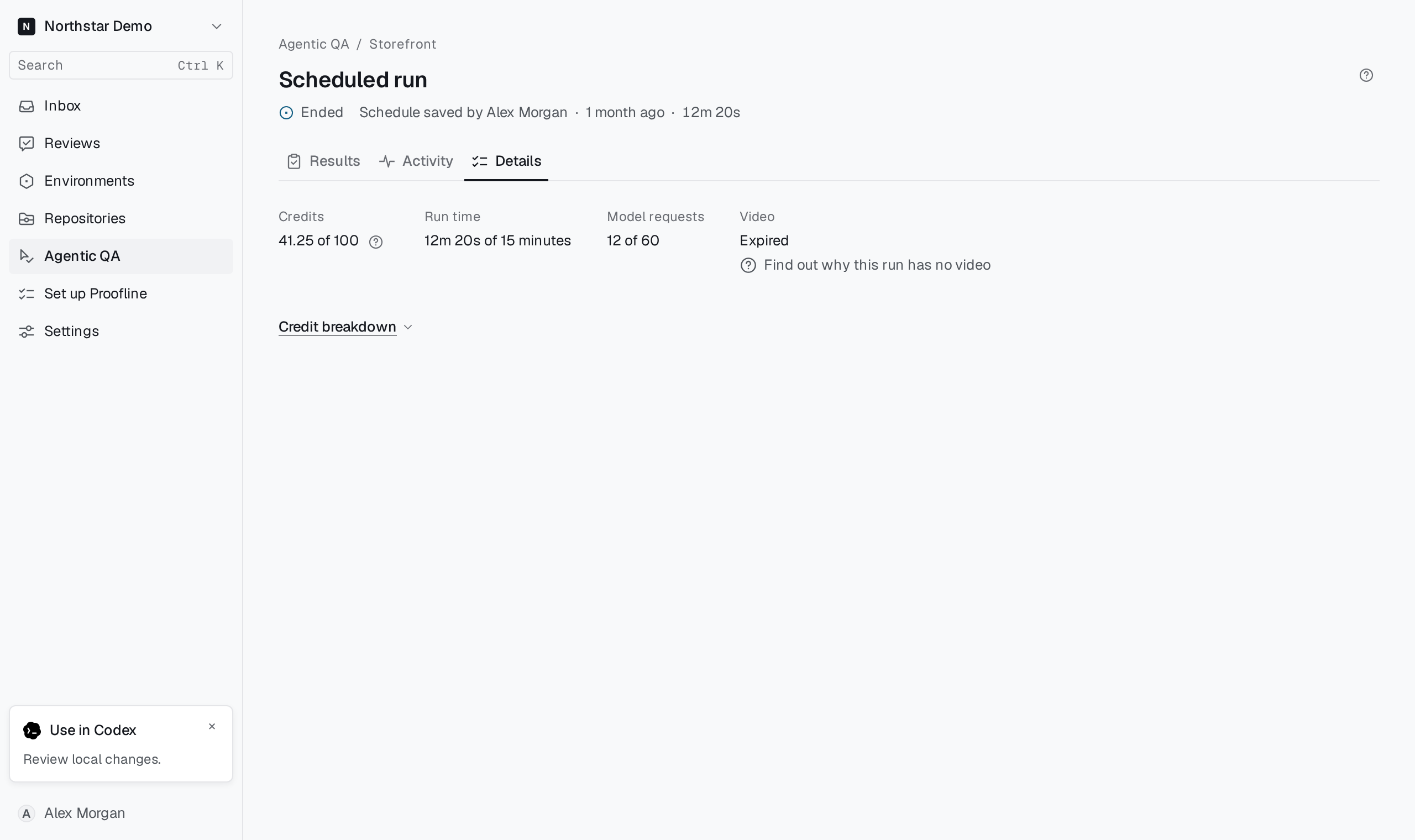
Check what the Video row says#
- Requested; not recorded, because recording was not available means recording was unavailable for that run. Check the setup's recording options before starting another run. Browser runs that use several browsers cannot record video.
- Not recorded means the run requested video, but the console found no recording. This also covers older runs that skipped capture because a journey signed in as a persona.
- Recording means the run is still active and the recording has no finalized video yet. Not finalized yet means the run ended and its recording still has no final result. Check Video again after the run ends, or reopen the run if it has already ended.
- Expired means the video's retention period ended. Deleted means the video was removed. The run page cannot play it in either case.
- Not recorded: the capture failed means capture failed before any video was kept. The capture failed; video was kept until then means you can look for the retained portion in Activity. Not recorded: no video was kept means the capture ended without retaining playable video.
Open a recording that won't play#
If Video adds This browser cannot play it, open the run in a browser that supports the recording format. If the player in Activity says The video could not be played., reopen the run and try playback again.
If the video plays and the moment you need is missing, locate the missing interval. When you cannot play video for the moment you need, check the run's traces and screenshots for the evidence it retained.