
Read gate requirement results in a weekly report
Use Gate requirements to see how confirmed requirements fared that week and which results counted toward a hold or passed under an exception. In the environment's Setup, open Weekly report and select the week.
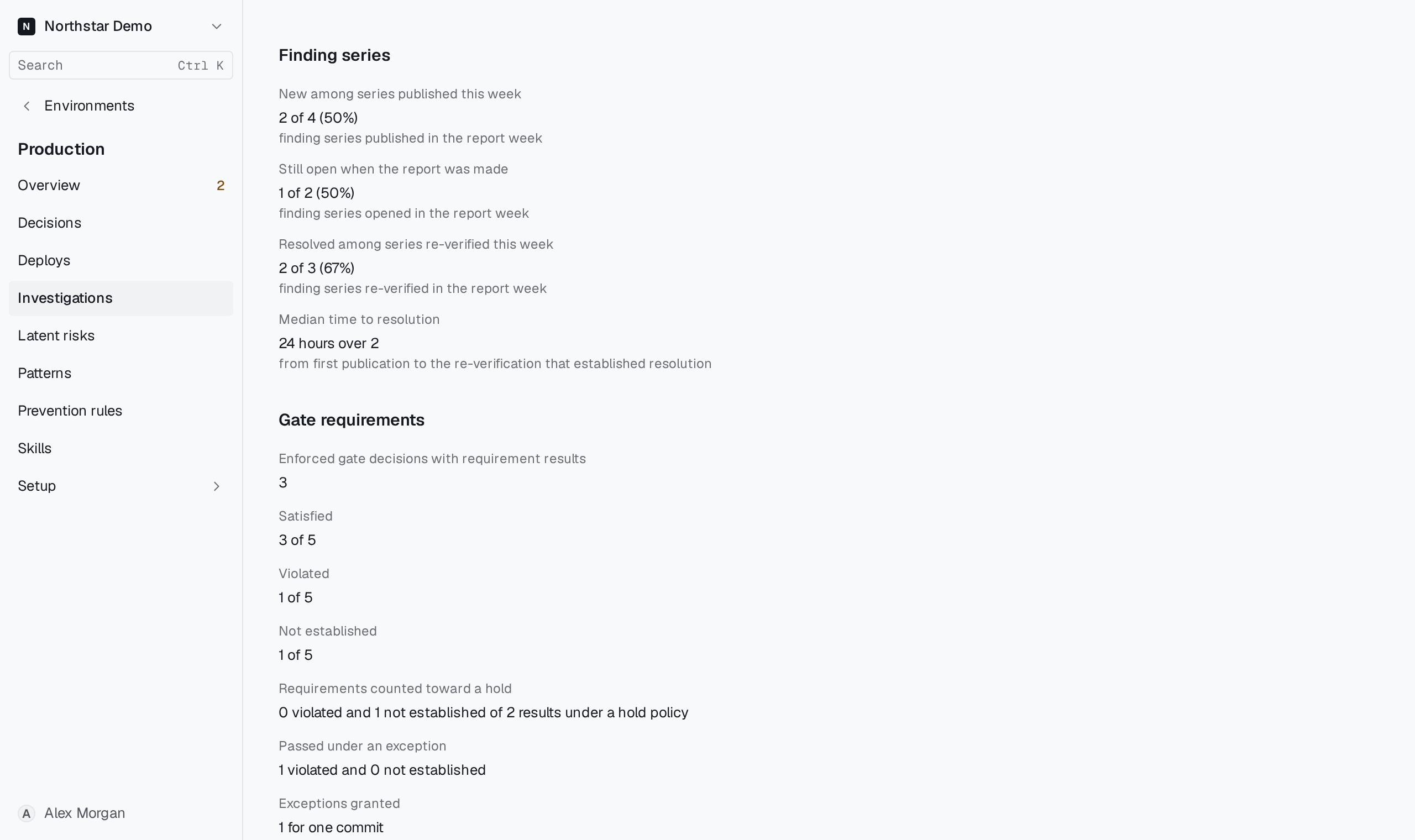
Read the results#
Enforced gate decisions with requirement results counts decisions that recorded at least one requirement result. One decision can contribute several results. If no enforced decision asked a confirmed requirement, the result rows are absent. Older reports may omit the section.
- Satisfied counts results that met the requirement.
- Violated counts results that showed the requirement was breached.
- Not established counts results where the gate could not establish whether the requirement was met.
Read the hold policy and exceptions#
Requirements counted toward a hold counts violations and unchecked requirements under a hold policy after taking out those that passed under an exception. The denominator includes all results under that policy. A report with older records may show Results under a hold policy, which includes results with an exception in those counts.
Passed under an exception appears when an exception let a violated or unchecked requirement pass. Older reports without the result breakdown may show only the recorded exception total. Exceptions granted counts the week's grants for one commit or until a date, including grants no decision used that week.
To see how the policy treats a requirement it cannot check, read what gates do with confirmed requirements.